
PDF Generation Template Editor
Open-source visual PDF generation engine with customizable templates and developer-friendly APIs.
ComPDF Conversion SDK provides an API for converting PDF to images.
Supported image formats include:
Supported image color modes include:
e_CColor: Color mode, where the image effect is consistent with the original PDF page.e_CGray: Grayscale mode.e_CBinary: Black and white mode.The SDK supports setting image scaling. If you want to double the image size, set image_scaling to 2.0f; to reduce the image size by half, set image_scaling to 0.5f.
The SDK supports image_path_enhance for enhancing the display of image paths. This option can be enabled when you want to improve the display effect of paths within the PDF page.
image_path_enhance option: 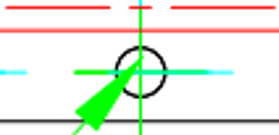
image_path_enhance option: 
image_scaling value results in images with higher resolution, but it also increases memory usage and slows down conversion.image_scaling value does not necessarily mean higher clarity. The clarity also depends on the original image resolution in the document.CConvertOption option = CPDF_DefaultConvertOption();
option.image_type = e_CJPEG;
CPDF_StartPDFToImage(CPDF_TEXT("jpeg.pdf"), CPDF_TEXT("password"), CPDF_TEXT("path/output"), option, NULL);
option.image_type = e_CPNG;
option.image_scaling = 2.0f;
CPDF_StartPDFToImage(CPDF_TEXT("png.pdf"), CPDF_TEXT("password"), CPDF_TEXT("path/output"), option, NULL);