
In the dynamic world of digital documentation, PDF Software Development Kits (SDKs) have emerged as indispensable tools for developers and businesses alike. These comprehensive toolkits enable seamless integration of PDF functionalities into applications, enhancing productivity and user experience.
Among the myriad options available, ComPDF and PSPDFKit stand out, they offer an array of features designed to cater to various needs to help developers improve their applications and enhance user experience.
In this article, we will compare them in terms of features, support, services, pricing, and more. Whether you are a developer looking for the best PDF integration tool or a business aiming to streamline document management, this guide will help you make an informed decision.
1. Overview
1.1 ComPDF
ComPDF SDK is a comprehensive solution designed for developers and allows them to build their excellent applications freely. It offers various powerful and reliable PDF library, which compatible with various platform such as Windows, Mac, Web, Android, iOS, Luxi, and so on.
With ComPDF, developers can take advantage of powerful features such as annotating, converting, editing, and signing PDF documents. This allows applications and products to manage PDF files more efficiently, enhancing document management, collaboration, and user experience. ComPDF's PDF library is meticulously designed to deliver stable and reliable performance, ensuring seamless integration of PDFs across various platforms and frameworks.
1.2 PSPDFKit
PSPDFKit SDK is a powerful PDF solution. With PSPDFKit, developers can integrate PDF, Office and other functions on multiple platforms or frameworks (such as Windows, Mac, Web, Android, iOS, etc.).
With PSPDFKit, developers can create cross-platform applications and seamlessly integrate excellent PDF functions into these applications, such as annotations, tables, editing, signatures, etc. This not only improves the user experience of employees or customers, but also effectively improves collaboration efficiency and promotes work efficiency.
2. Feature Comparison
In this part, we will make a comparison of the features of ComPDF SDK and PSPDFKit SDK, with a particular focus on PDF-related functionalities. Below is a comparison of some important features:
From the above table, it is not difficult to see that both ComPDF and PSPDFKit offer navigation, custom menus, text search, and other features. However, it is worth mentioning that ComPDF provides a text reflow function, which PSPDFKit does not mention.
In terms of annotations, ComPDF offers 10+ types of annotations, while PSPDFKit supports more than 15 types. But you should note that ComPDF provides predefined annotations and annotation permission settings, which PSPDFKit does not explicitly mention.
Regarding document comparison, both ComPDF and PSPDFKit support text comparison and overall document comparison. However, ComPDF's change list offers more convenient navigation, improving work efficiency.
When talking about conversion, PSPDFKit mentions the conversion between PDF documents and Office documents, pictures, while HTML to PDF. In addition, ComPDF also supports the conversion between CSV, TXT, RTF, and PDF documents, as well as PDF to HTML.
What's more, ComPDF offers a remarkable one-stop solution – IDP (Intelligent Document Processing). This solution covers the entire document processing workflow, assisting companies and enterprises in achieving digital transformation of their business processes. It improves document processing efficiency, and at the same time it significantly reduces human errors, thereby saving costs for businesses.
3. Supported Platform and Frameworks Comparison
You have learned the features' difference between ComPDF and PSPDFKit. In this part, we will compare the platforms/frameworks supported by ComPDF and PSPDFKit. Here, we have listed some common and important platforms/frameworks.
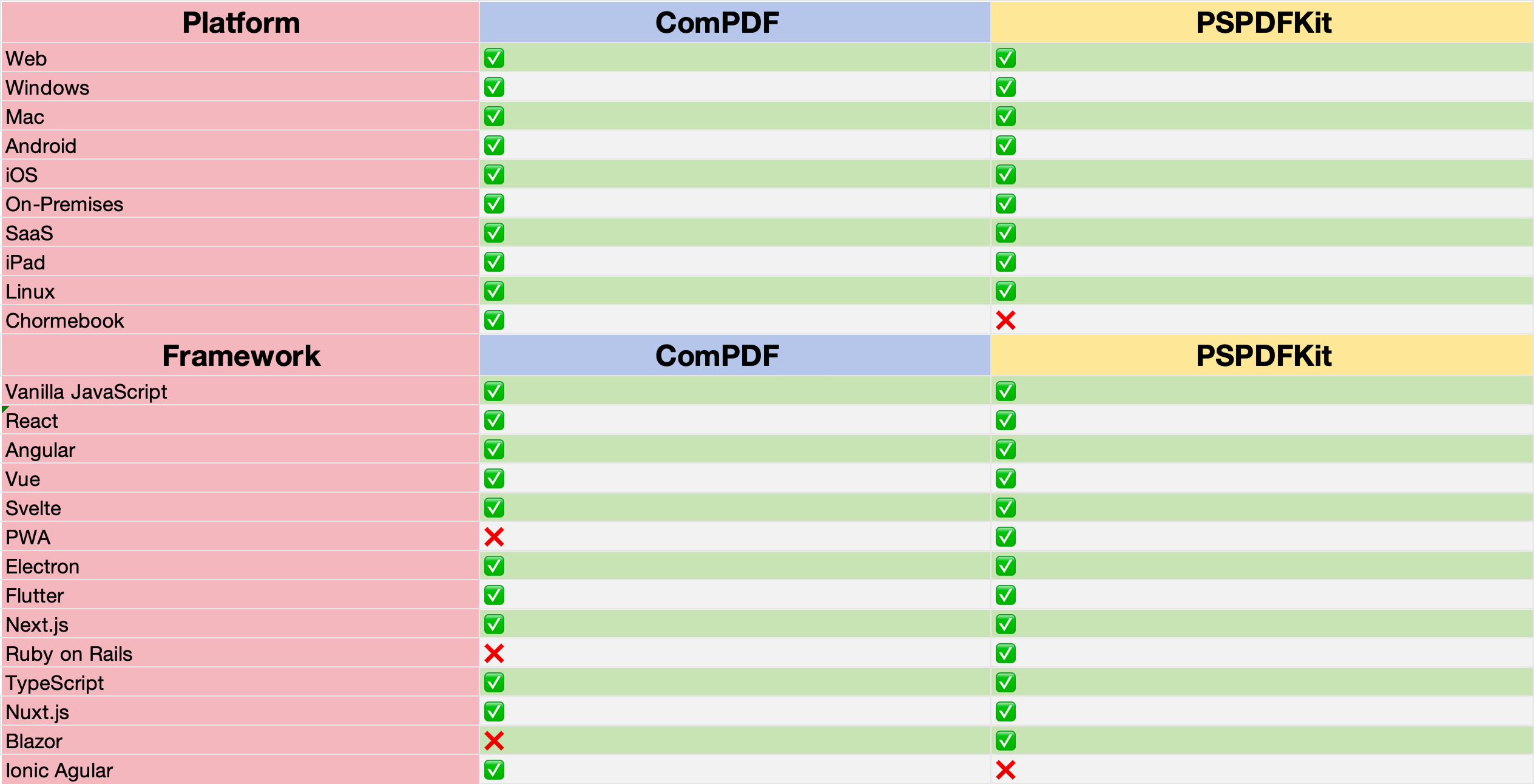
It is not difficult to notice that ComPDF and PSPDFKit support almost the same number of platforms. However, it is noteworthy that ComPDF additionally supports the Chromebook platform, which PSPDFKit does not mention.
In terms of supported frameworks, ComPDF supports the Ionic Angular framework, which PSPDFKit does not support, while PSPDFKit supports the PWA, Ruby on Rails, and Blazor frameworks, which ComPDF does not specify support for.
4. ComPDF vs PSPDFKit Price Comparison
ComPDF offers a simple and flexible pricing method. It meets specific needs and provides unlimited files, developers, and locations. In addition, ComPDF provides community licenses for individual developers, startups, and non-profit organizations to create a collaborative and mutually beneficial environment.
And before purchasing a license, ComPDF supports a trial key for 30-day deployment. Surprisingly, you can also get free and timely technical support during this trial period.
PSPDFKit officially advocates on-demand pricing, which means price changes based on different products and quantities. Similarly, PSPDFKit also offers a 30-day free trial for you. However, unlike ComPDF, you need to register an account by visiting the "PSPDFKit Portal" page before you can get your free trial.

In addition, if you need to get free trials for different platforms, you need to complete a questionnaire after getting the first free trial before you can get free trials for other platforms again. In this regard, ComPDF allows direct obtain without filling out the extra questionnaire.
4.1 How to get a free license for ComPDF
- Visit ComPDF's Pricing page
- Fill in the required information as required
- Click the Get Your Trial License button
- You can check your license in your email later
5. The Service Comparison Between ComPDF and PSPDFKit
ComPDF is committed to providing proactive and timely support to optimize user experience. They offer multiple free support channels, including 24/5 Email & chat support, remote support, and unlimited bug requsts. This ensures that developers can quickly get professional and effective solutions. Even customers who are using the free trial version can enjoy comprehensive pre-sales, in-sales, and after-sales services, including one-on-one technical support and responsive service.
For licensing support, ComPDF provides a 30-day trial license. If the trial license expires for special reasons, an extended trial license can be obtained by contacting ComPDF. It's delightful to note that they also offer preferential policies for small and medium-sized enterprises and individual developers, and support resource exchange needs for charities and individual developers.
In comparison, PSPDFKit offers scheduled a call, Email support, and remote support. If you want to discuss your project and get professional support, you need to schedule a call in advance and the call duration is limited to 30 minutes. Although PSPDFKit also provides a 30-day trial license, it does not mention community licenses or other preferential policies.
In summary, ComPDF demonstrates significant advantages in terms of service and support. Its responsive service and flexible licensing support policies provide maximum convenience for developers and small and medium-sized enterprises, significantly reducing costs.
6. How do Users Evaluate Them?
6.1 ComPDF
" We chose ComPDF for the exceptional expertise in implementation. Your superior features and technical support have won me over and we really expect seamlessly integrating your product into ours. We suppose after sometime, you will replace our all with yours."
-From Sarah Rodriguez
Development Manager, Financial Services
" ComPDF is very easy to integrate. I was able to run through the documentation and successfully managed the setup of the web application in less than one hour - quite amazing, indeed."
-From Mark Dixon
Developers, Ebook
" We are a startup working on project management platform for the construction industry. We plan to integrate PDF viewing and annotations to our document feature. ComPDF generously supports us with the community license, which not only saves our cost but also brings our users a better experience."
-From William Scott
Developer, Construction
6.2 PSPDFKit

-From https://sourceforge.net/

-From https://sourceforge.net/

-From https://slashdot.org/
7. Which One You Should Choose? ComPDF or PSPDFKit?
ComPDF and PSPDFKit both offer professional PDF SDK solutions to help developers save time in PDF application development, optimize document collaboration processes, and improve collaboration efficiency. Which one better suits your needs? Here, we have conducted a comprehensive comparison to help you make a better decision.
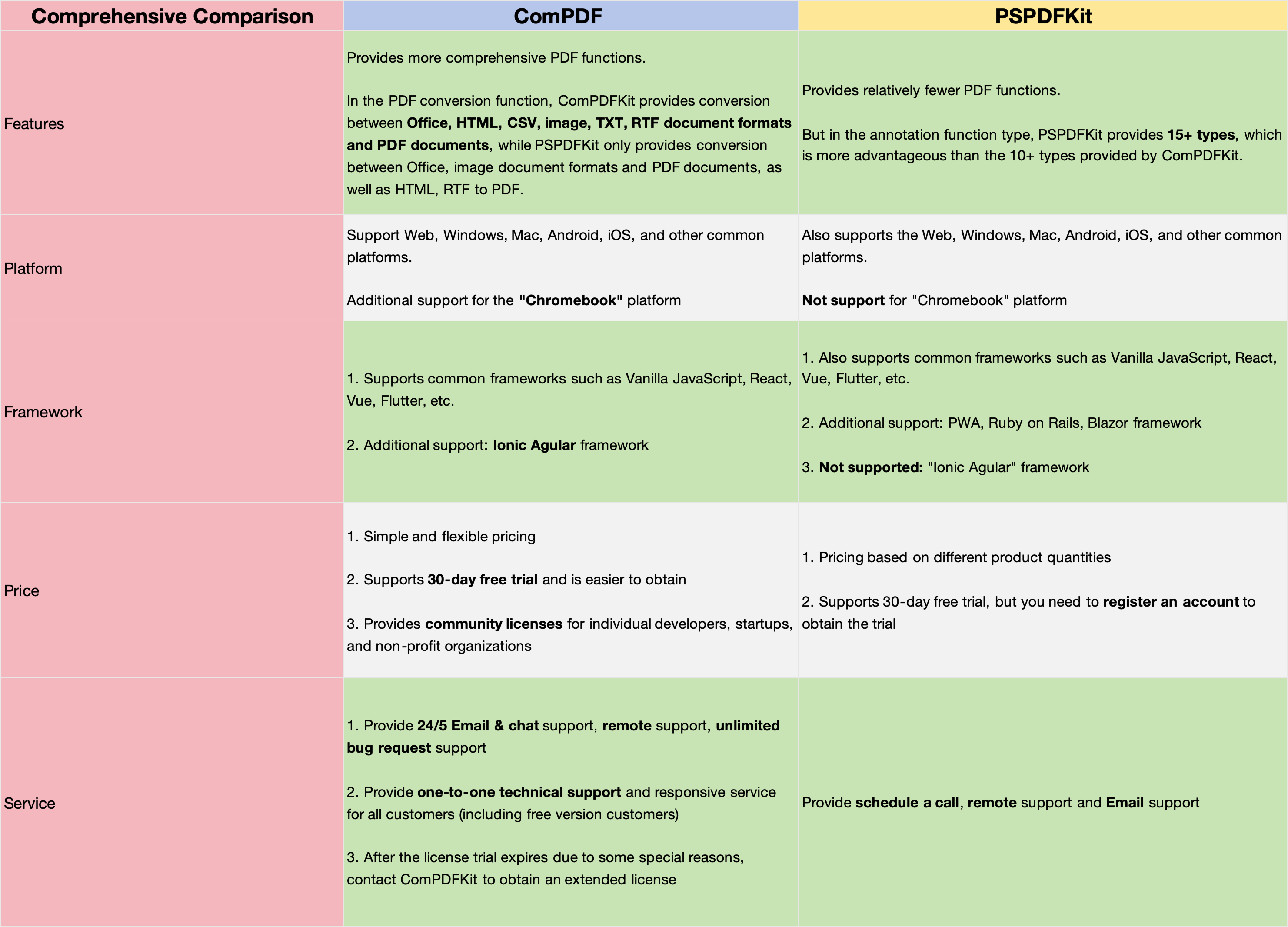
Based on the above table, we can clearly see that ComPDF has significant advantages in terms of PDF conversion functionality, price, and services. Therefore, if you want to integrate comprehensive PDF conversion features into your application, ComPDF will be your right choice. If you expect to get better service at a more favorable price, ComPDF should naturally be your top choice as well.
Regarding platform support, if you require to integrate your application on a Chromebook, then ComPDF is the only solution that can provide the assistance and services you need.
In terms of framework support, PSPDKit has more advantages and can be a good choice. However, if you intend to develop your application using Ionic Angular, choosing ComPDF will be the right decision.
In summary, both have their distinct advantages, and choosing the one that best meets your needs is the wisest decision.
Final Words
This article compares ComPDF and PSPDFKit in terms of features, pricing, platform support, services offered, and user reviews.
It's not hard to see that ComPDF has significant advantages in terms of PDF conversion functionality, pricing, service, and platform support. On the other hand, PSPDKit offers more advantages in the support of development frameworks. So, when you need to make a decision, just follow your needs.