Multiple SDK Vendors
Separate solutions for Viewing, Generation, OCR, Signatures, Forms
Embed enterprise-grade PDF viewing, service documentation, customer approvals, AI extraction, and document automation directly into your field service platform.
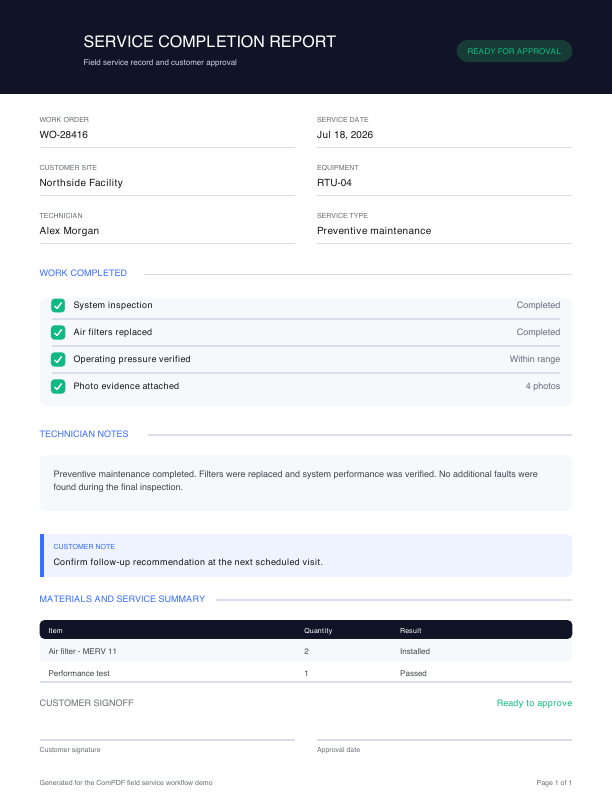
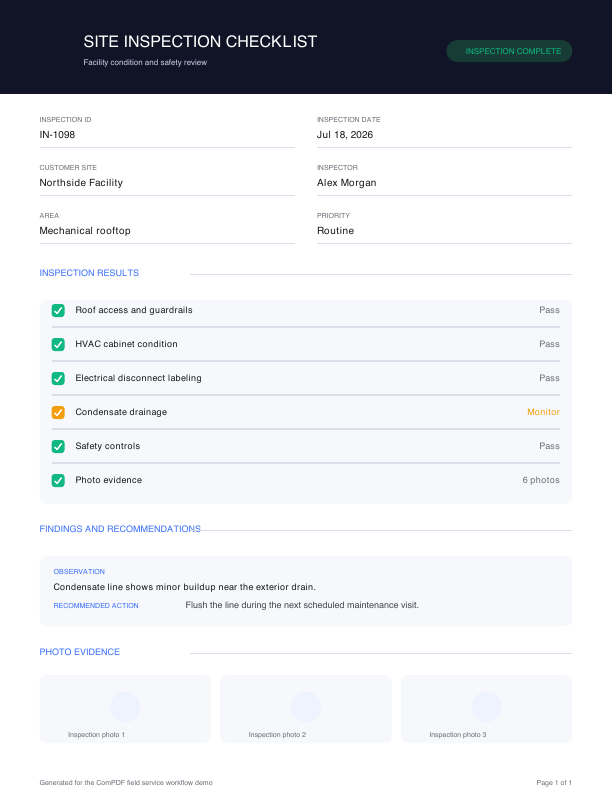
Modern field service software must manage operational documents throughout the service lifecycle.
Separate solutions for Viewing, Generation, OCR, Signatures, Forms
Different implementations across iOS, Android, Flutter, Web
Technicians frequently work without internet connectivity.
Photos, reports, and engineering documentation create performance challenges.
Approval workflows require secure PDF interactions.
Customers increasingly expect structured data extraction from service documentation.
Render large, multi-page service documents on mobile devices, with offline access for field teams.
Add comments, highlights, drawings, and review markups directly to service documents.
Capture structured field data in service reports, inspection forms, checklists, and work orders.
Generate consistent service reports, invoices, certificates, and inspection records from application data.
Compare document revisions to identify changes across inspections, maintenance records, and work orders.
Capture customer, technician, and supervisor approvals inside the service workflow.
Convert scanned reports, legacy documents, and paper inspection forms into searchable text.
Extract work order, equipment, customer, table, and layout data into structured JSON.
Protect service documents with encryption, permissions, watermarks, audit logs, and redaction.
Apply the same PDF infrastructure across the specialized field service products your customers rely on.

Connect maintenance reports, installation records, and complete service history.

Standardize inspection documentation, asset maintenance, and building reports.

Manage installation reports, network inspections, and tower maintenance in the field.

Keep asset inspections, work orders, and service restoration reports connected.

Document preventive maintenance, equipment inspections, and compliance reporting.

Create treatment reports, inspection records, and customer acknowledgements.
Explore seven document capabilities with field service samples built for each workflow.
Use the resources required to evaluate, integrate, and deploy ComPDF across your field service applications.
import { ComPDFViewer } from '@compdf/web-sdk'

const viewer = new ComPDFViewer({
  container: '#viewer',
  documentUrl: '/service-report.pdf',
  enableAnnotations: true,
  enableForms: true,
  enableSignature: true
})

viewer.load()Compare mobile PDF capabilities across leading vendors using official documentation.
| Mobile capability | ComPDF official documentation | Adobe Acrobat Services official documentation | Apryse official documentation | Nutrient official documentation | Foxit official documentation | Aspose.PDF official documentation | iText official documentation |
|---|---|---|---|---|---|---|---|
| Offline PDF rendering | On-device mobile SDKs | No native mobile viewer | On-device viewing | Offline mobile SDKs | Native iOS/Android viewer | Android API; no viewer UI | Library only; no mobile UI |
| Local storage | Local paths and URIs | Cloud; app-managed files | App-managed device files | App-managed device files | Local open and save | Disk, memory, and web | App-managed files and streams |
| Incremental synchronization | XFDF import/export | App-managed state sync | Real-time collaboration | Offline XFDF / Instant JSON | FDF, XFDF, and XML | App-managed document sync | App-managed document sync |
| Image capture | Image APIs + host capture | Image-to-PDF cloud API | Image viewing and markup | Host-app image workflows | Mobile scanning add-on | Disk, memory, and web images | PDF image insertion |
| Touch annotations | Native annotation UI + APIs | Embed API markup | 35+ annotation tools | Mobile annotation UI | Built-in annotation UI | APIs; app-built UI | APIs only; no mobile UI |
| Camera integration | Host-app camera | Host-app camera | Host-app camera | Host-app camera | Mobile scanning module | Host-app camera | Host-app camera |
| GPS metadata | Host-app GPS metadata | Host-app GPS metadata | Host-app GPS metadata | Host-app GPS metadata | Host-app GPS metadata | Host-app GPS metadata | Host-app GPS metadata |
| Secure synchronization | PDF security; app transport | HTTPS/TLS cloud transfer | On-device; app transport | Permissions + server sync | Encryption; app sync | PDF encryption; app transport | Encryption/signatures; app sync |
Choose the deployment model that fits your field service software architecture.
Deploy document processing and AI services quickly across connected field service workflows.
Maintain control over processing, access, and operational boundaries.
Support controlled infrastructure and data governance for distributed service teams.
Keep document review and approvals moving when technicians work beyond the network.
Embed PDF viewing, mobile forms, service reports, customer signoffs, and AI extraction into field service applications with one offline-ready, cross-platform SDK.