
PDF 生成模板编辑器
开源可视化 PDF 生成引擎,支持自定义模板,并提供面向开发者的 API,灵活构建文档生成流程。
通用 HTML 模板生成 PDF 功能需要一个 HTML 模板以及用来填充模板的结构化数据,就是 JSON 数据,从而生成一个标准的 HTML。再使用生成 PDF 功能相应的接口就可以将标准的 HTML 转成 PDF 文档。
模板是一个 HTML 文件,还需要一个与模板匹配的 JSON 数据。 JSON 数据是一个正常的 JSON 文件。HTML 模板文件需要结合 JSON 数据以生成一个标准的 HTML。 结合 JSON 数据和 HTML 模版生成 HTML 的过程支持变量、if 语句、for 循环、四则运算、常用函数。
HTML 模板示例:
<!doctype html>
<html>
<body style="margin: 0; padding: 0;">
<table cellpadding="0" cellspacing="0" width="100%" style="border-collapse: collapse; margin: 0 auto">
  <tr>
    <td style="padding-top: 40px;">
      <img
          src="{% if compdfkit %}images/logo.png{% else if compdfkit2 %}images/logo2.png{% else %}images/logo3.png{% endif %}"
          alt="PDF Technologies"
          width="203"
          height="50">
    </td>
    <td style="padding-top: 40px; text-align: right;">
      <img src="images/invoice.png" alt="invoice" width="132">
      <td style="border: 1px solid #8A8EA8; padding: 2px 10px;">{{billNo}}</td>
    </td>
  </tr>
</table>
<table cellpadding="0" cellspacing="0" width="100%" style="border-collapse: collapse;">
  <!-- {% set totalprice = 0 %} -->
  <!-- {% for item in items %} -->
  <tr style="height:64px;color:#333;">
    <td style="width:70px;height:70px;border-bottom: 2px solid #F3F3F3; padding-left: 10px; text-align: left;">
      {{ item.index }}
    </td>
    <td style="width: 160px;border-bottom: 2px solid #F3F3F3; font-size: 13px; line-height: 15px; color: #121E3F;text-align:left;">
      <div>
        <p style="font-size: 13px; line-height: 15px; font-weight: bold; color: #121E3F; margin: 0;">
          {{ item.product }}
        </p>
        <p style="font-size: 11px; line-height: 12px; padding-top: 4px; color: #5F6881; margin: 0;">
          {{ item.startDateAndEndDate }}
        </p>
      </div>
    </td>
    <td style="width: 130px;border-bottom: 2px solid #F3F3F3; font-size: 13px; line-height: 15px; color: #121E3F;text-align:left;">
      {{ item.paymentCycle }}
    </td>
    <td style="width: 100px;border-bottom: 2px solid #F3F3F3; font-size: 13px; line-height: 15px; color: #121E3F;text-align:left;">
      {{ item.gearLevel }}
    </td>
    <td style="width: 100px;text-align:left;border-bottom: 2px solid #F3F3F3; font-size: 13px; line-height: 15px; color: #121E3F;">
      $ {{ item.price }}
    </td>
  </tr>
  <!-- {% set totalprice = totalprice + item.price %} -->
  <!-- {% endfor %} -->
  <tr>
    <td style="width:70px;"></td>
    <td style="width:160px;"></td>
    <td colspan="2" style="width: 100px; text-align:right; font-weight: bold; font-size: 16px; line-height: 18px; color: #121E3F; padding-right: 72px;">Total:</td>
    <td style="width: 100px; text-align:left; font-weight: bold; font-size: 16px; line-height: 18px; color: #121E3F;">$ {{round(totalprice * (1 + tax * 0.01), 2)}}</td>
  </tr>
</table>
</body>
</html>如上面示例中所示,HTML 模板中,存在一些非 HTML 标准的内容,比如: {% if compdfkit %}, {{billNo}}, <!-- {% set totalprice = totalprice + item.price %} -->, <!-- {% for item in items %} --> 等。这些非 HTML 标准的内容包括变量、if 语句、for 循环、四则运算、常用函数,这几种类型。
变量
<td style="border: 1px solid #8A8EA8; padding: 2px 10px;">{{billNo}}</td>上面 {{billNo}} 就是一个变量,即变量需要 {{ }} 框住,对应 JSON 文件中名为billNo 的条目。
如果 JSON 文件中不存在相应名字,需要先定义。下面是定义变量的示例。
<!-- {% set totalprice = 0 %} -->示例模板中,上面一行代码定义了一个 totalprice变量。和前面的 billNo 变量一样, {{ }}框住后使用:{{totalprice}}。
四则运算
<!-- {% set totalprice = totalprice + item.price %} -->上面一行代码对totalprice进行计算,加减乘除都支持。
if 语句
<img
     src="{% if compdfkit %}images/logo.png{% else if compdfkit2 %}images/logo2.png{% else %}images/logo3.png{% endif %}"
     alt="PDF Technologies"
     width="203"
height="50">其中 {% if compdfkit %} … {% else if compdfkit2 %}...{% else %}...{% endif %} 是一个完整的 if 语句结构,else if和 else 可省略。compdfkit、compdfkit2对应着 JSON 文件中同名的条目。
for 循环
<!-- {% set totalprice = 0 %} -->
<!-- {% for item in items %} -->
               ……….
      <!-- {% set totalprice = totalprice + item.price %} -->
<!-- {% endfor %} -->{% for item in items %}...{% endfor %}是一个 for 循环的结构。其中items是 JSON 文件中的一个数组类型的数据。
常用函数
<td style="width: 100px; text-align:left; font-weight: bold; font-size: 16px; line-height: 18px; color: #121E3F;">$ {{round(totalprice * (1 + tax * 0.01), 2)}}</td>其中,round是函数,可以传入变量做为函数参数。totalprice、tax是变量。整个函数用{{ }}框住。
准备标准格式的 JSON 数据,用来和 HTML 模板结合,将数据填充到模板中,以生成标准的 HTML。JSON 数据示例:
{
    "address": "456 Oak Avenue",
    "billNo": "2345678901",
    "company": "TechCorp Ltd.",
    "country": "Canada",
    "email": "[email protected]",
    "firstName": "Alice",
    "gearLevel": "Pro",
    "compdfkit": false,
    "compdfkit2": true,
    "invoiceDate": "2025-01-15",
    "lastName": "Smith",
    "paymentCycle": "Yearly",
    "price": "1200",
    "province": "Ontario",
    "startDateAndEndDate": "2025-01-15 to 2025-02-15",
    "tax": 8,
    "zip": "K1A 0A6",
    "items": [
        {
            "index": 1,
            "product": "ComPDFKit Pro",
            "startDateAndEndDate": "2025-01-15 to 2025-02-15",
            "paymentCycle": "Yearly",
            "gearLevel": "Pro",
            "price": 800
        },
        {
            "index": 2,
            "product": "ComPDFKit API",
            "startDateAndEndDate": "2025-01-15 to 2025-02-15",
            "paymentCycle": "Monthly",
            "gearLevel": "Basic",
            "price": 400
        }
    ]
}JSON 文件与 HTML 模板结合转换为 PDF:
//HTML模板文件路径
String templatePath = "/template_1.html";
//JSON文件路径
String jsonPath = "/data1.json";
//生成的HTML文件路径
String outHtmlPath = "/outHtml.html";
//生成的PDF文件路径
String outPdfPath = "/outPdf.pdf";

//JSON 文件与 HTML模板结合生成 HTML
CHtmlConverter.CErrorCode id = CHtmlConverter.HtmlRenderTemplate(templatePath, jsonPath, outHtmlPath);
// HTML 转为 PDF
id = CHtmlConverter.ConvertToPdf(outHtmlPath, outPdfPath);这个示例中,HtmlRenderTemplate 和 ConvertToPdf 这两步可以由 RenderAndConvertToPdf这一个接口替代。
//HTML模板文件路径
String templatePath = "/template_1.html";
//JSON文件路径
String jsonPath = "/data1.json";
//生成的PDF文件路径
String outPdfPath = "/outPdf.pdf";
CHtmlConverter.CErrorCode id = CHtmlConverter.RenderAndConvertToPdf(templatePath, jsonPath, outPdfPath);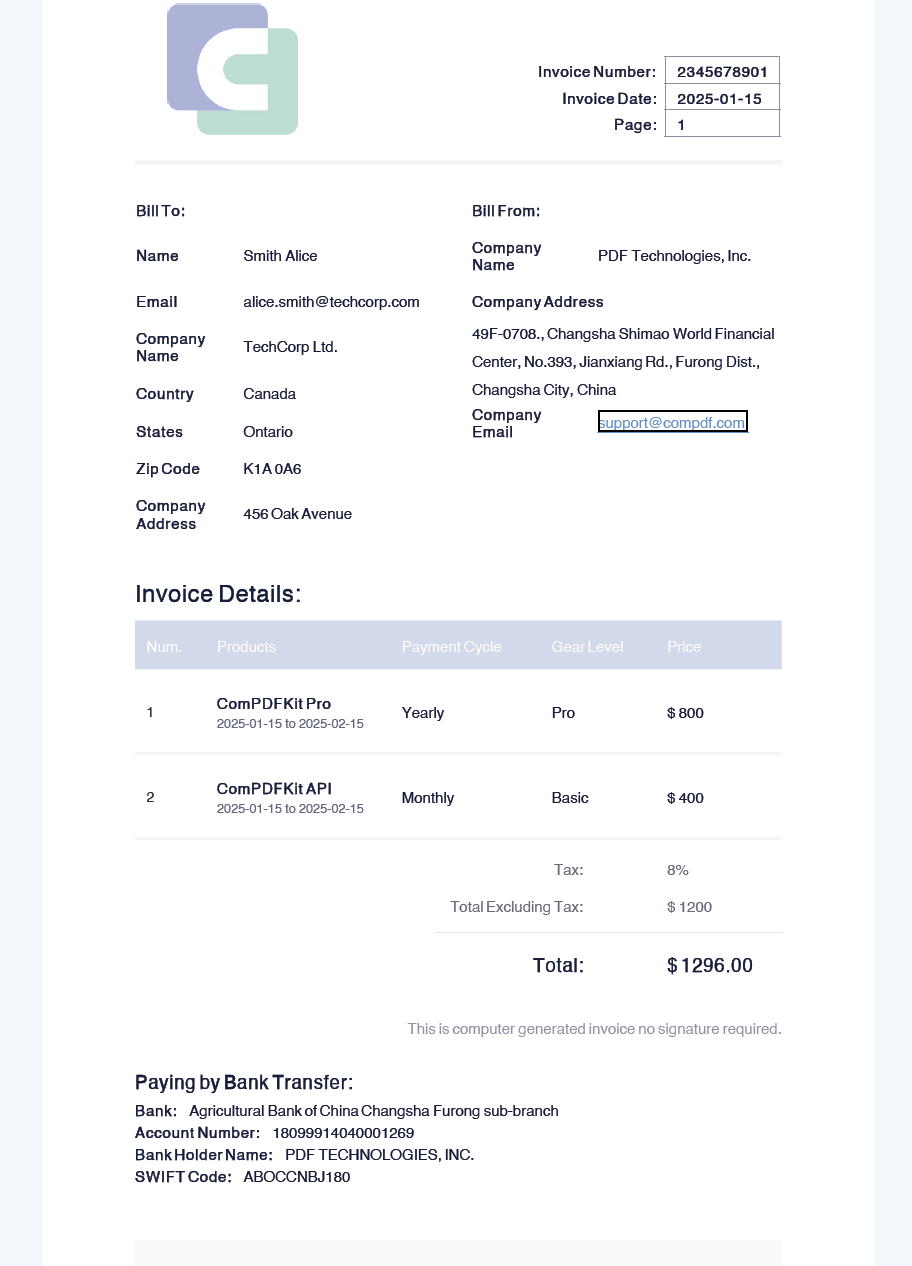
配置属性
当转换 HTML 为 PDF 时,可以使用一些属性,像是 base uri、page size、font。
//HTML模板文件路径
String templatePath = "/test/template_1.html";
//JSON文件路径
String jsonPath = "/test/data1.json";
//生成的HTML文件路径
String outHtmlPath = "/test/outHtml.html";
//生成的PDF文件路径
String outPdfPath = "/test/outPdf.pdf";

//将 JSON 文件与HTML模板结合生成 HTML
CHtmlConverter.CErrorCode id = CHtmlConverter.HtmlRenderTemplate(templatePath, jsonPath, outHtmlPath);

//当换时使用属性
CConverterProperties properties = new CConverterProperties();
//设置页size
CSize size = new CSize(400, 600);
properties.setPageSize(size);
//设置字体目录
CFontProvider fontProvider = new CFontProvider();
fontProvider.addDirectory("/test/fontDir/");
properties.setFontProvider(fontProvider);

// 使用属性,将HTML 转为 PDF
id = CHtmlConverter.ConvertToPdf(outHtmlPath, outPdfPath, properties);这个示例使用了 fontProvider.addDirectory("/test/fontDir/")。应该提供一些字体文件,并放置到 /fontDir/ 目录中,这样 HTML 文件中的文本就能使用这些提供的字体。 下面是部分 HTML 示例代码,其中 span 内的文本使用了 Sarabun 字体。Sarabun 是提供的字体,相应的字体文件应放置在正确的目录中。
<style data-dito-stylesheet-name="setFonts">@font-face {
    font-family: "Sarabun";
}
@font-face {
    font-family: "Sarabun";
    font-style: italic;
}
@font-face {
    font-family: "SarabunThin";
}
@font-face {
    font-family: "SarabunsemiBold";
}</style>

<div style="margin-left:0in;margin-top:0pt;margin-bottom:0pt">
  <span style="font-family:Sarabun">
    <span style="color:black">
      <span style="font-size:26px">(PEA GECC Internal Audit)</span>
    </span>
  </span>
</div>在转换过程中,HTML 模板和 JSON 可以是内容字符串、InputStream、文件对象或文件路径。生成的 PDF 可以是 OutputStream、文件对象或文件路径。 前面的示例使用了文件路径,而以下是使用其他类型的示例。
使用输入流与输出流:
String templatePath = "/test/template_1.html";
String jsonPath = "/test/data1.json";
String outPdfPath = "/test/outPdf.pdf";
try {
    InputStream htmlIn = new FileInputStream(templatePath);
    InputStream jsonIn = new FileInputStream(jsonPath);
    OutputStream pdfOut = new FileOutputStream(outPdfPath);
    CHtmlConverter.CErrorCode error = CHtmlConverter.RenderAndConvertToPdf(htmlIn, jsonIn, pdfOut);
} catch (Exception e) {

}使用内容字符串:
String getFileContent(String path) {
        StringBuilder content = new StringBuilder();
        try (BufferedReader br = new BufferedReader(new InputStreamReader(new FileInputStream(path)))) {
            String line;
            while ((line = br.readLine()) != null) {
                content.append(line).append(System.lineSeparator());
            }
            return content.toString();
        } catch (IOException e) {
            return "";
        }
    }

String templatePath = "/test/template_1.html";
String jsonPath = "/test/data1.json";
String outPdfPath = "/test/outPdf.pdf";
try {
    String templateStr = getFileContent(templatePath);
    String jsonStr = getFileContent(jsonPath);
    OutputStream pdfOut = new FileOutputStream(outPdfPath);
    CHtmlConverter.CErrorCode error = CHtmlConverter.RenderAndConvertToPdf(templateStr, jsonStr, pdfOut);
} catch (Exception e) {

}使用文件:
String templatePath = "/test/template_1.html";
String jsonPath = "/test/data1.json";
String outPdfPath = "/test/outPdf.pdf";
try {
    File templateFile = new File(templatePath);
    File jsonFile = new File(jsonPath);
    File pdfFile = new File(outPdfPath);
    CHtmlConverter.CErrorCode error = CHtmlConverter.RenderAndConvertToPdf(templateFile, jsonFile, pdfFile);
} catch (Exception e) {

}