
By integrating ComPDF Skills — the professional PDF processing engine, OpenClaw evolves into a true personal AI PDF assistant, capable of automated document handling.
This article details the five core capabilities of ComPDF Skills: High-Fidelity Conversion, Precision Page Manipulation, OCR-Enhanced Recognition, Document Security & Optimization, and File Comparison. Together, they empower AI to execute a truly "hands-free" document processing automation.
Steps to Build Your Personal AI PDF Assistant on OpenClaw
Here are the main steps to create your AI PDF Assistant. For detailed instructions, please refer to the article — How to install OpenClaw.
-
Prepare Requirements: Ensure you have Node.js version 22 or higher installed on your system (macOS, Windows with WSL2, or Linux).
-
Install OpenClaw: Run the following command in your terminal for a quick installation:
For Terminal on Mac/Linux:
curl -fsSL https://openclaw.ai/install.sh | bashFor PowerShell or WSL2 terminal on Windows:
iwr -useb https://openclaw.ai/install.ps1 | iex -
Initialize Setup: Run openclaw onboard --install-daemon to start the setup wizard. This configures your workspace, gateway, and connects your preferred AI model (e.g., Anthropic or OpenAI).
-
Install ComPDF Skills
-
Configure PDF Access: Move your PDF files into the designated OpenClaw workspace or knowledge folder.
-
Run and Test: Run openclaw dashboard to open the local dashboard (http://127.0.0.1:18789), select your document, and begin querying.
Capability 1: High-Fidelity Conversion
Imagine needing to convert a received PDF contract into a Word document for editing, a financial report PDF into an Excel sheet for data analysis, or a scanned document into Markdown for note-taking. In these scenarios, standard conversion tools often only extract the plain text, losing crucial table structures and formatting, which leads to hours of manual adjustments. With ComPDF Skills integrated, OpenClaw transforms from a simple reader into a precision conversion tool.
Feature Details of ComPDF Skills
With ComPDF Skills, OpenClaw gains the ability to convert PDFs and images into multiple formats (Word, Excel, Markdown, etc.) using a "high-fidelity" approach that preserves original layout, tables, and images—not just text. OpenClaw can now accurately handle standard and merged cells in Excel and use AI to analyze complex or borderless tables.
Powered by the ComPDF Conversion SDK (with AI layout analysis enabled by default), it intelligently processes multi-column documents and mixed fonts. It trained on millions of documents, improves conversion accuracy by 98%.
PDF Conversion Automation Scenarios
-
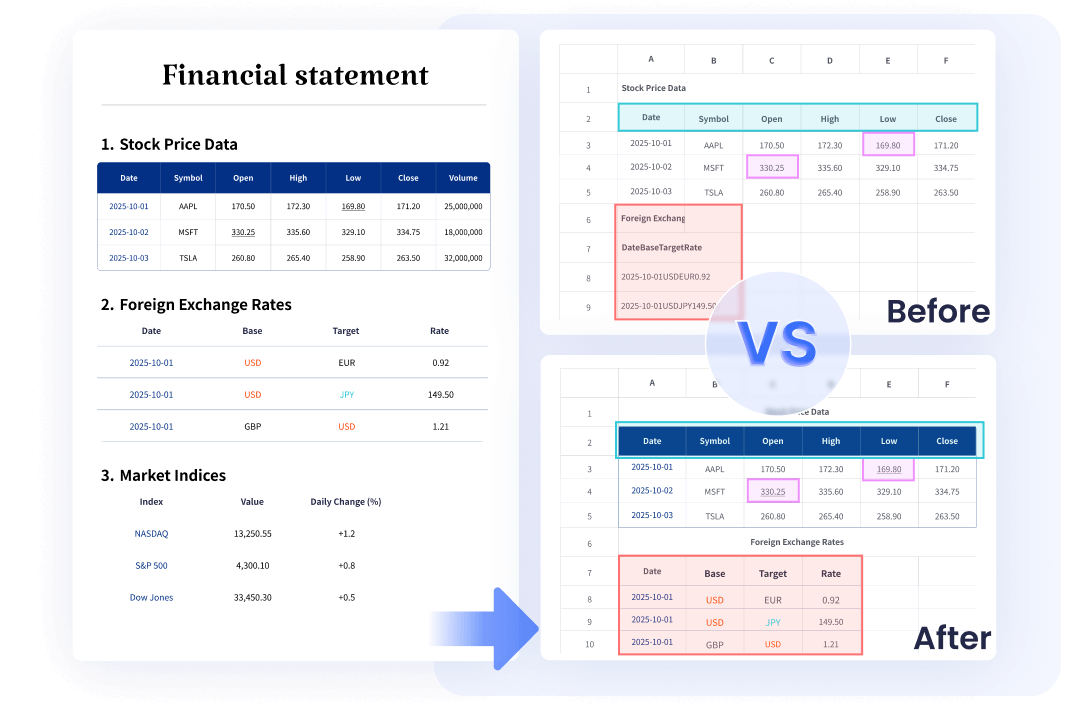
When a user needs to analyze revenue data from a listed company's annual report, they can simply ask OpenClaw, "Help me convert this annual report PDF into Excel to analyze revenue changes over the past three years." OpenClaw, after integrating ComPDF Conversion Skills, could automatically identify all table structures and output an Excel file with correct formulas and formatting, making the data immediately ready for pivot tables and charts without any manual cleanup.
-
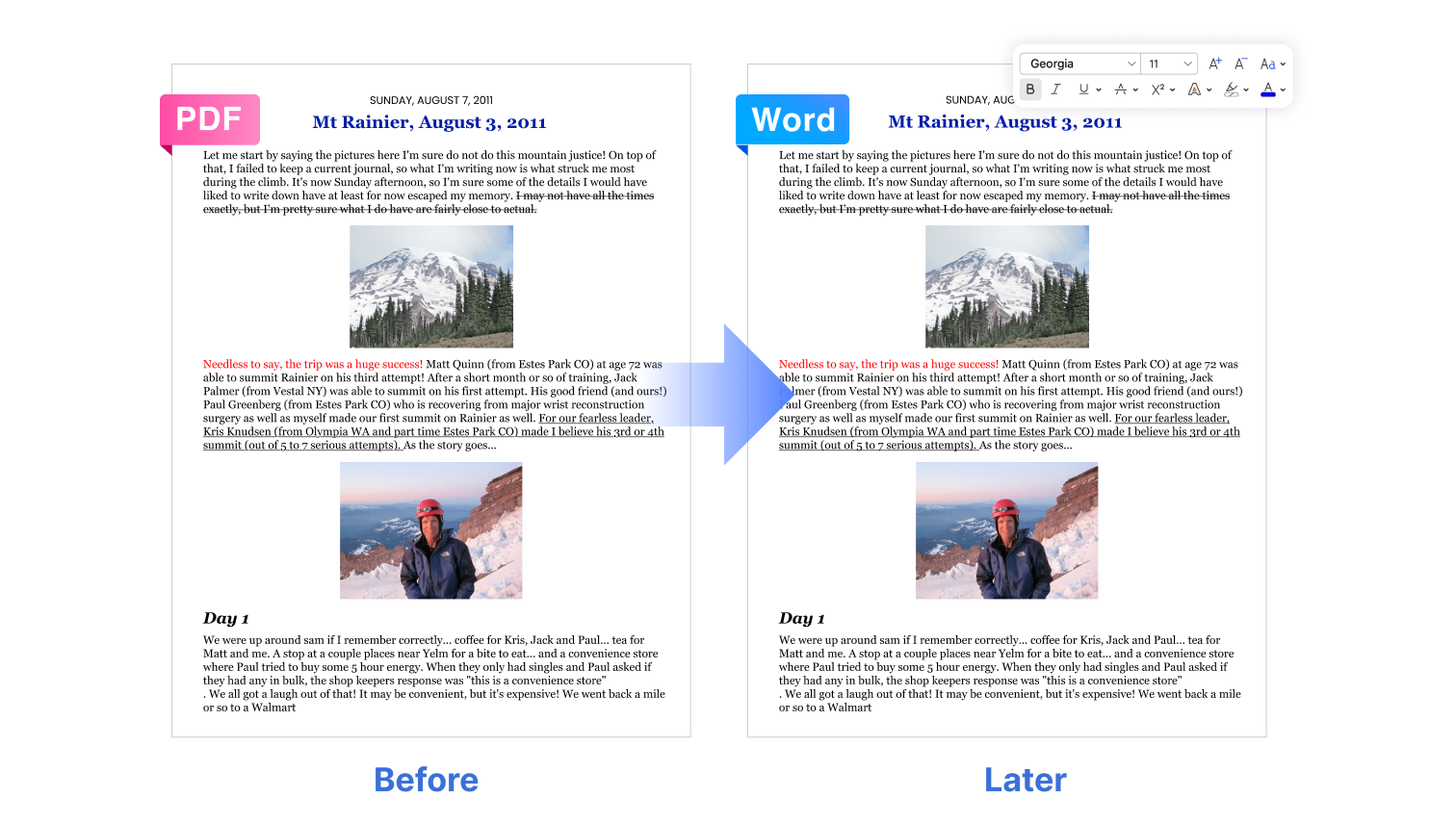
For editing scanned contracts, a user can request, "Convert this scanned lease contract into a Word document so I can modify the lease terms." OpenClaw performs high-fidelity conversion that perfectly restores the original layout, including fonts, paragraph spacing, headers, and footers, allowing the user to edit the document as if it were originally created in Word.
-
When a user wants to create study materials from an ebook, they can instruct OpenClaw, "Convert this PDF ebook into Markdown format for my note-taking app." OpenClaw intelligently preserves the document's structure, including heading levels, blockquote formatting, and code blocks, ensuring a seamless and organized note-taking experience without any reformatting work.
Capability 2: Precision Page Manipulation
Tasks like extracting specific chapters from a hundred-page report, merging multiple related documents, deleting unwanted pages, or rotating a scanned page that is sideways—these operations typically require opening a professional PDF tool and doing them manually. With ComPDF Skills, OpenClaw becomes your hands-free page operation expert.
Feature Details of ComPDF Skills
Through simple conversational commands, users can ask OpenClaw to execute complex page operations without manual tools. At the API level, precise control is achieved via parameters like pageRanges for targeted actions, giving OpenClaw the power to:
-
Page Extraction: Precisely extract specific pages by page number or range.
-
Page Merge/Split: Merge multiple PDF documents or split a single document based on rules (e.g., split every 5 pages into a new file).

-
Page Delete/Insert: Intelligently delete unnecessary pages and insert new content or blank pages at specified locations.
-
Page Rotation: Correct pages that were scanned in the wrong orientation.
PDF Page Processing Automation Scenarios
-
In a bid proposal scenario, a user can command an OpenClaw instance equipped with ComPDF Skills, "Extract pages 15-30 from the technical document and pages 5-10 from the commercial document, then merge them into a single bid file." OpenClaw precisely extracts the specified page ranges from each source and combines them in the correct order, generating a complete, structured proposal document ready for submission.
-
For document cleanup, a user dealing with a poorly scanned file can say, "Three pages in this scan are upside down, please rotate them, and also delete the last two blank pages." OpenClaw automatically detects the inverted pages based on content analysis, rotates them correctly, and intelligently identifies and removes the blank pages, resulting in a clean, professional document.
-
When organizing educational materials, a user can request, "Split this textbook into separate PDF files by chapter." The AI analyzes the document's structure or follows specified page ranges to automatically split the large file at each chapter break, outputting individual, well-named PDF files for each chapter.
Capability 3: OCR-Enhanced Conversion
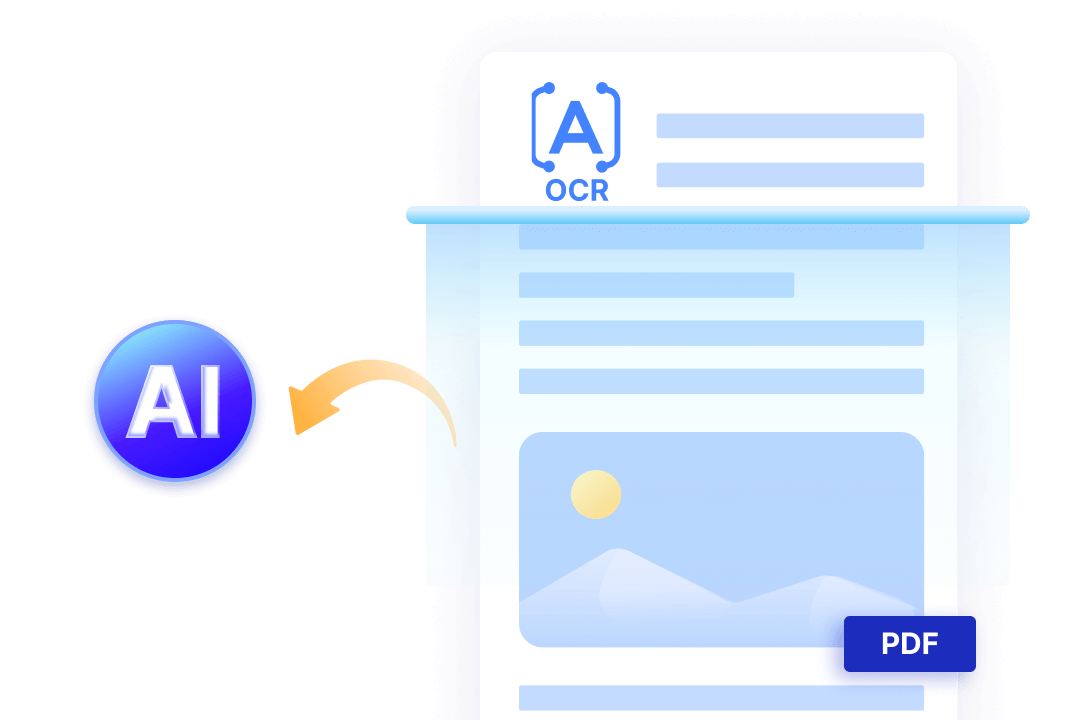
Scanned paper contracts, handwritten meeting minutes, or photographed book pages—documents that exist as "images." While a human can understand them at a glance, they represent an insurmountable barrier for most AI assistants. They cannot "see," therefore they cannot "read," let alone process or analyze the content for you. ComPDF Skills gives OpenClaw the "eyes" it needs—leveraging advanced OCR to extract data from images and scanned PDFs, transforming static visuals into dynamic, multi-format digital assets.
Feature Details of ComPDF Skills
ComPDF's OCR (Optical Character Recognition) technology is purpose-built to solve this:
-
OCR Support Range: Recognizes text from scans, handwritten notes, and mixed print-handwritten documents. Whether it's contracts, invoices, resumes, or handwritten notes, text is extracted accurately.
-
Multi-language Support: Supports over 80 languages and regional variants, including Simplified/Traditional Chinese, English, Japanese, Korean, Arabic, Thai, and Greek.
-
Intelligent Recognition: It doesn't just recognize text; it preserves the original layout logic—table structures, paragraph order, and font styles. Since version 1.8.0, it supports OCR table recognition, capable of converting table images into structured data.
-
Configurable Options: Users can configure whether to enable OCR, select recognition languages, and define the recognition scope (scanned pages, garbled characters, or all).
OCR works best when enabled alongside AI layout analysis. When converting scanned documents containing tables, enabling OCR ensures that inserted images are placed precisely into the correct cells, rather than appearing as a large background block covering the text.
PDF OCR Automation Scenarios
-
For digitizing historical records, a user might request, "Convert these scanned handwritten archives from the Republican era into a searchable PDF." The OCR engine accurately recognizes the traditional Chinese handwriting and generates a PDF with an embedded text layer, transforming unsearchable images into a fully searchable digital archive.
-
When working with foreign language materials, a user can say, "This Japanese technical manual is in image format; convert it to a Word document for translation." The system accurately recognizes all Japanese characters within the images, preserving the original layout and the positioning of technical diagrams, resulting in a fully editable document that maintains its original structure.
-
To process handwritten notes, a user can upload a photo and instruct, "Here's a photo of yesterday's handwritten meeting notes; convert them into structured text." The OCR technology recognizes the handwriting, intelligently interprets paragraph breaks and lists, and outputs a clean, well-formatted text file that can be immediately shared or archived.
Capability 4: Document Security & Compress
High token overhead and lack of document governance are major hurdles for AI-driven document analysis. By adding the PDF Editor Skills of ComPDF to OpenClaw, users can mitigate these issues at the source. The integration enables high-ratio document compression to significantly reduce the context window burden on LLMs, alongside automated security features like watermark injection, ensuring that your automated workflows are as safe as they are efficient.
Feature Details of ComPDF Skills
-
Smart PDF Compression: Pre-process documents before sending them to the AI to reduce token consumption. This is a crucial step for cost optimization—compressing a document before invoking a large model can significantly lower processing costs.
-
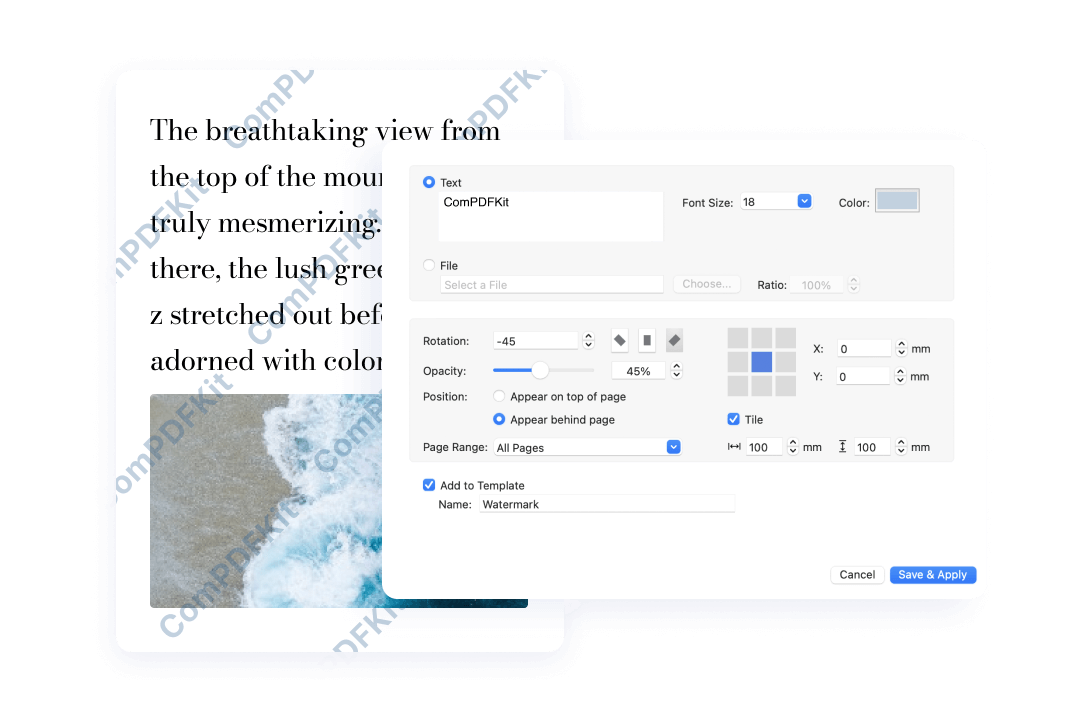
Watermarking: Add text or image watermarks to output documents to protect copyright. Operations for both adding and removing watermarks are supported.
PDF Automation Scenarios
-
To manage AI processing costs effectively, a user handling a large document can say, "I need a summary of this 200-page technical white paper, but processing it directly will cost too many tokens." The system intelligently compresses the document by extracting its core textual content and key data before sending it to the LLM, potentially reducing token consumption by up to 70% and significantly lowering costs.
-
For protecting sensitive intellectual property, a user preparing to share files externally can instruct, "Add our company watermark to this design proposal PDF before sending it to the client." The system can batch-process the document, adding a customized, transparent text or image watermark to every page, ensuring the company's brand and copyright are protected.
Capability 5: PDF Comparison
Lawyers reviewing contract changes, finance teams comparing report variances, editors checking file revisions — these tasks are time-consuming, labor-intensive, and prone to human error when done line by line. Integrating ComPDF Skills into OpenClaw eliminates this friction.
Feature Details of ComPDF Skills
-
Full Coverage of Difference Types:
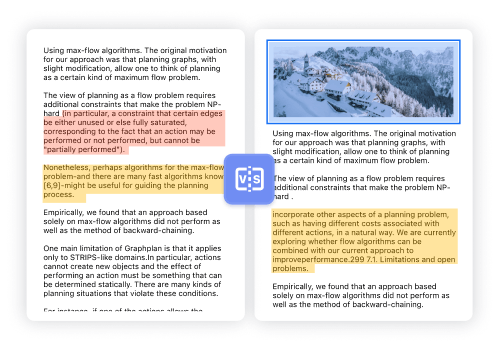
Text Content: Additions, deletions, and modifications, tracked down to the individual character.
Formatting & Style: Changes in font, size, bold/italic, and color.
Structural Changes: Paragraph adjustments, image changes, and table modifications.
-
Visual Presentation:
Color Coding: Additions, deletions, and modifications are distinguished using different colors.
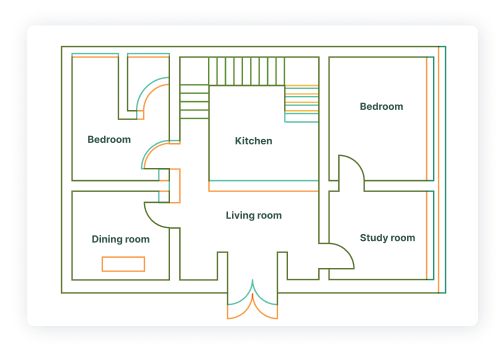
Comparison Modes: Offers side-by-side and overlay comparison modes to suit different types of documents.
Layer Overlay: The comparison results can be overlaid directly onto the original document.
PDF Automation Scenarios
-
In a legal or procurement context, a user can ask, "Here are versions V1 and V2 of a procurement contract. Show me exactly what changes the other party made." The comparison engine rapidly compares both documents and generates a detailed difference report, using color coding to highlight every single addition, deletion, or modification, down to the last punctuation mark.
-
For compliance and regulatory tracking, a professional might inquire, "What are the key differences between the newly released industry standard and last year's version?" The tool compares the two PDF documents and produces a side-by-side or overlay report, clearly highlighting all changed clauses and regulatory updates to facilitate quick and accurate compliance analysis.
-
In an academic setting, an instructor can request, "Check this student's thesis revision against their original draft to ensure all required changes were made." The system generates a comprehensive comparison report that clearly distinguishes between completed revisions and any missed edits, providing clear feedback for both the instructor and the student.
Conclusion
The ComPDF Skills are more than just added features; it equips OpenClaw with the "hands-on ability" to handle complex documents. It elevates OpenClaw from a "conversational Q&A tool" to a "productivity execution tool," enabling end-to-end automation in document workflows. From receiving a file, understanding its content, and performing operations, to outputting the final result—the entire process requires no manual intervention.