
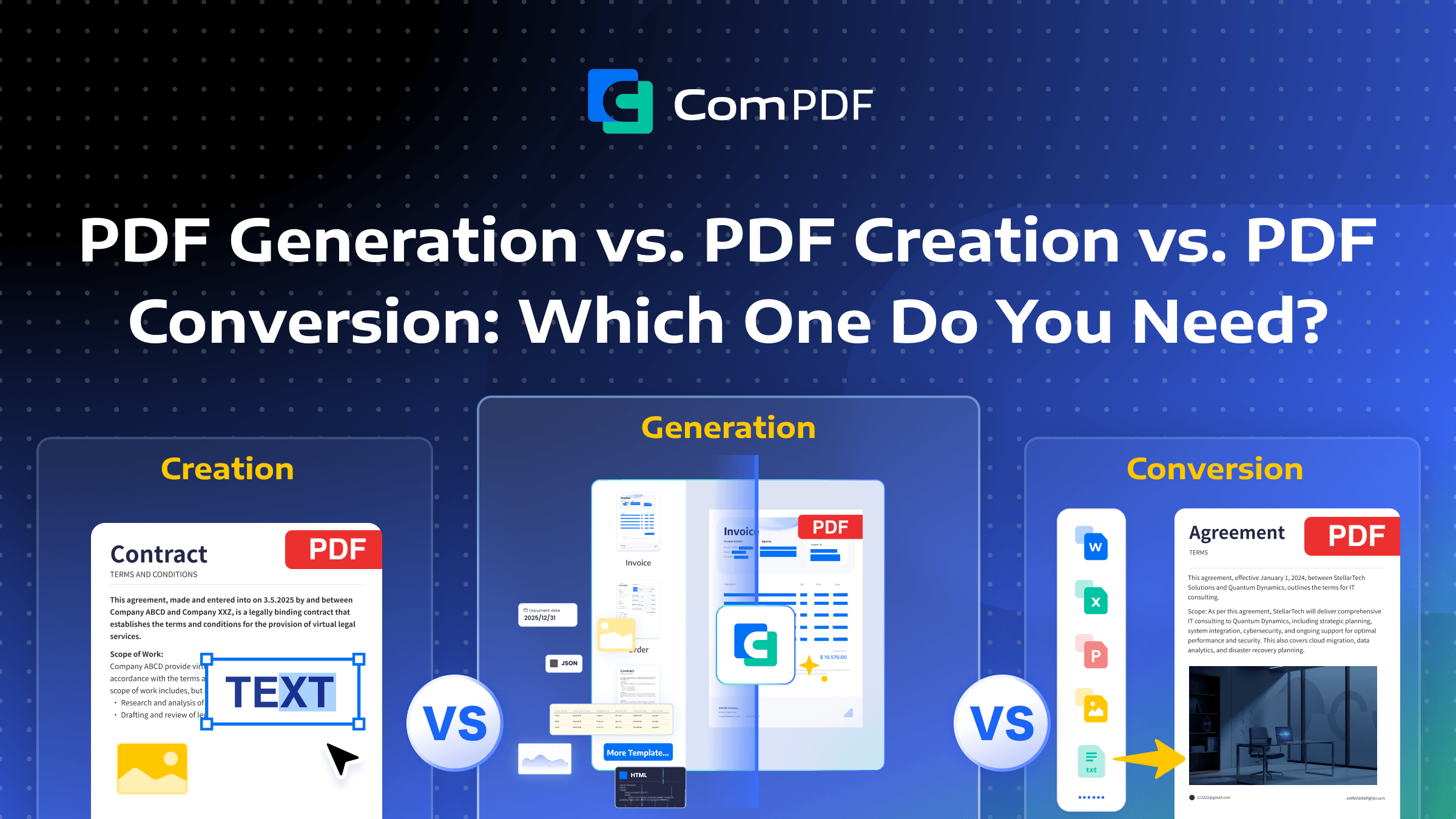
PDF is the most widely used format for document sharing because it preserves layout across devices and platforms. However, when working with PDFs, people often encounter three similar terms: PDF Creation, PDF Conversion, and PDF Generation.
In simple terms, PDF creation is about building a new document from scratch, PDF generation involves a system automatically assembling data to output a document, and PDF conversion is the process of turning an existing file into a PDF.
These three methods represent fundamentally different technical paths and underlying principles, each suited for different scenarios. This article will delve into their core differences, helping you make an informed choice based on your specific needs.
PDF Generation: Data-Driven & Code-Based
What is PDF Generation?
PDF generation is the process of programmatically creating PDF documents using templates, structured data, or custom code. It enables automated, scalable, and consistent document creation across applications.
How to Generate PDFs?
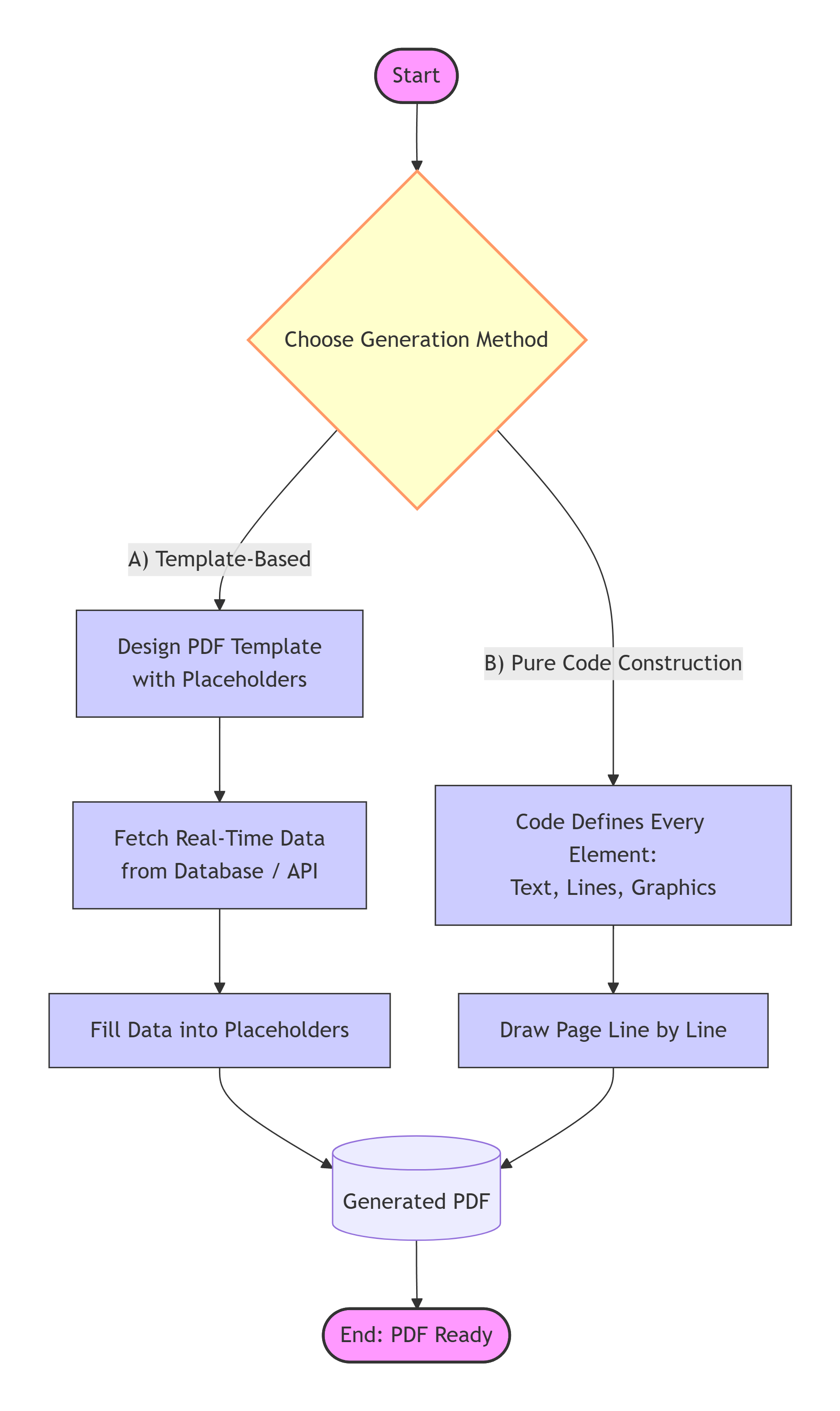
PDF generation is a powerful tool for developers, centered on the combination of code logic and data. It primarily operates in two modes:
-
Template-Based Dynamic Population: This is the most common mode. A developer first designs a PDF template containing placeholders (e.g., the layout of an invoice). Then, through code (e.g., using the ComPDF Generation SDK), real-time data is fetched from a database or API (like customer name, list of items, total amount). This data is then precisely "filled into" the template's placeholders to generate a final PDF containing the specific information.
-
Pure Code Construction: For documents with unstructured or highly complex content, developers can bypass templates and use code instructions to define every element on the page. The library renders text, images, and vector elements programmatically to construct the final PDF layout.
What is a PDF Generator Used for?
-
Automated Billing Systems: After a user places an order, an e-commerce platform automatically calls a PDF generation service to create an electronic invoice, packing slip, or statement in real-time based on the order data.
-
Business Report Generation: A company's data analysis system periodically pulls sales data from a database to automatically generate monthly or annual analysis reports, complete with charts, in PDF format.
-
Batch Document Generation: An HR system generates standardized offer letters or employment contracts for a group of new hires, automatically populating them with each individual's personal information.
PDF Creation: Visual Design & Manual Composition
What is PDF Creation?
PDF creation involves using professional editing a PDF editor to design or edit PDF files manually, such as adding or modifying elements (text boxes, images, signatures, form filling, redaction, etc.) or by merging existing resources. This method is more suitable for modifying, supplementing, or reorganizing an existing PDF, ultimately saving it as a new version.
How PDF Creation Works?
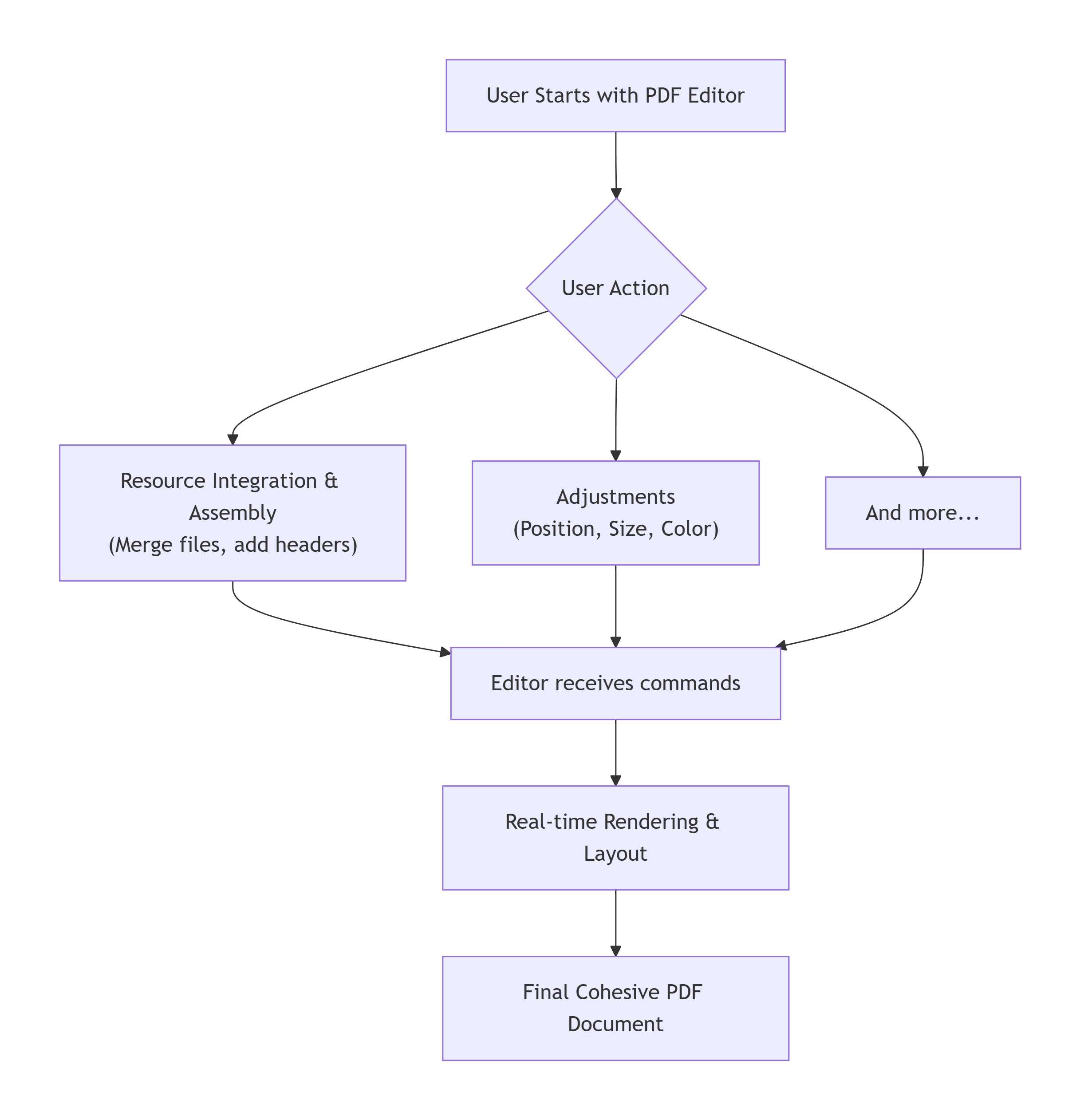
PDF creation relies on feature-rich PDF editors. Its working principle is akin to WYSIWYG (What You See Is What You Get) publishing software:
-
User Interaction & Commands: The user interacts directly with the graphical interface, for example, by clicking an "Insert Image" button or drawing a text box on the page and typing text.
-
Real-time Rendering & Layout: The editor's backend receives the user's commands in real time and immediately renders the corresponding graphics or text on the page. Users can adjust the position, size, color, and layering of elements at any time.
-
Resource Integration & Assembly: Users can also merge multiple PDF files, insert blank pages, or add headers and footers. The editor compiles all pages and elements into a single, cohesive PDF document.
ComPDF offers a free online PDF editor that allows users to modify PDF content as easily as using a word processor.
Applications of PDF Creation
-
Form Filling and Signatures: Manually entering information, adding digital signatures, or creating handwritten signatures on electronic contracts or application forms.
-
Document Annotation and Review: Highlighting text, adding comments, or redacting content on a received PDF report.
-
Marketing Material Design: Creating simple flyers or business cards from scratch by combining images, artistic text, and graphics.
-
File Consolidation: Merging several separate PDF files into a complete project proposal or e-book.
PDF Conversion: From One Format to Another
What is PDF Conversion?
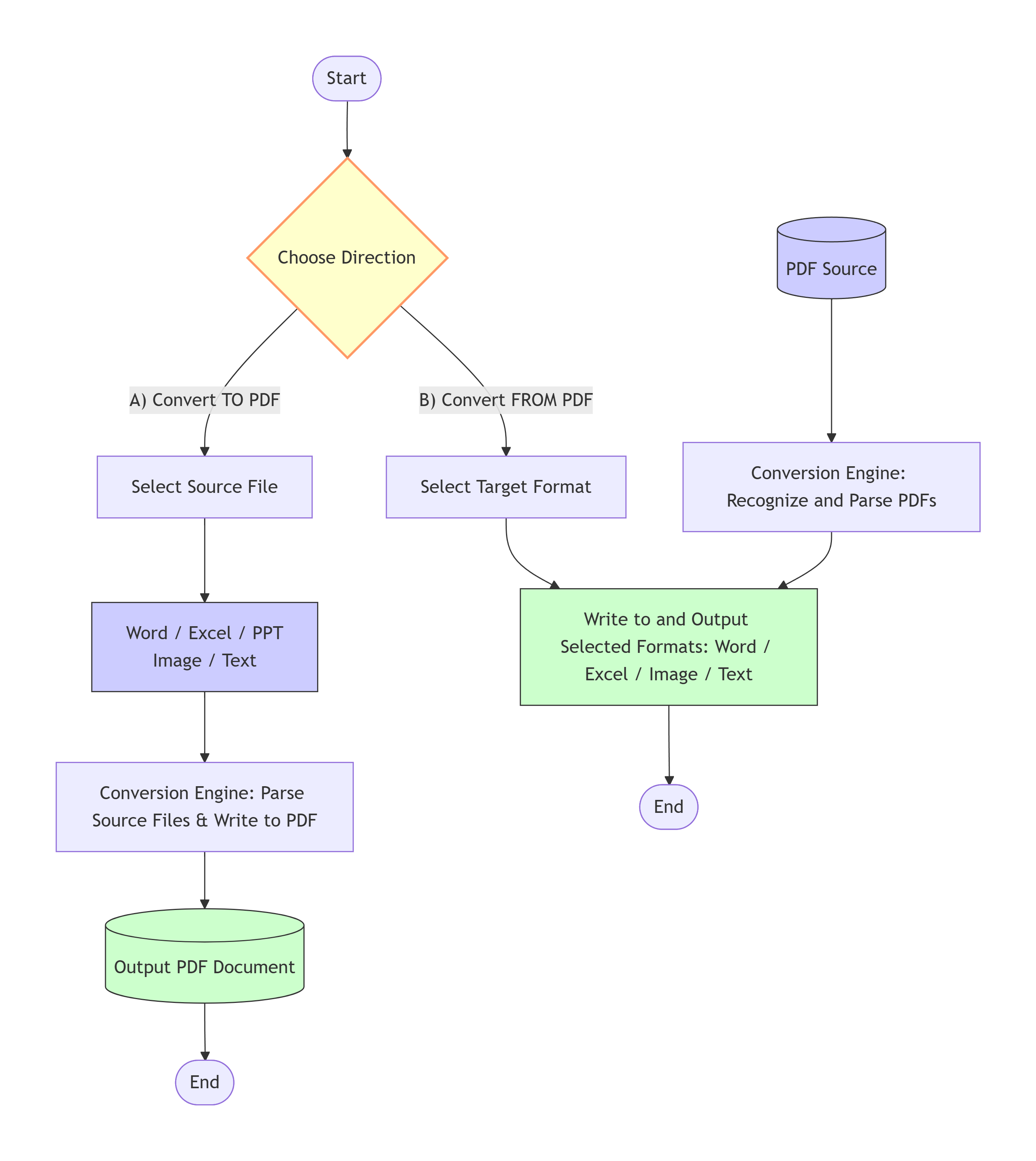
PDF conversion refers to transforming an existing file into PDF or converting a PDF into another format. This includes converting a PDF back into other editable or usable formats, as well as converting existing non-PDF documents (such as Word, Excel, JPG, TXT, etc.) into PDF format through parsing and reconstruction. It is a critical process for enabling document interoperability, content reuse, and information sharing in both business and personal workflows.
How PDF Conversion Works?
The core of PDF conversion is parsing the structure of the source document and reconstructing it in the other format, including text blocks, tables, images, and layout elements. The working principle is roughly illustrated in the diagram below:
-
Requires a Source File: Conversion requires a complete source document to exist first (e.g., contract.docx). The conversion process itself changes the file's format, not its content.
-
Focuses on "Format Mapping": The essence is to map the structured information of the source document (like paragraph styles and table structures) into corresponding elements within the PDF.
-
Quality Depends on Parsing Accuracy: The main challenge in conversion is layout fidelity. Conversion typically works well for plain text documents and structured data (like .docx files). However, for unstructured data (like scanned images), parsing is more difficult, and the resulting PDF may have layout imperfections.
Many PDF libraries and online tools support document conversion. For example, ComPDF Conversion SDK and its online tools provide high-fidelity conversion for formats such as PDF, Word, Excel, PPT, images, Text, JSON, and HTML.
Applications of PDF Conversions
-
Document Archiving and Distribution: Convert editable Office documents (like contracts or reports) into a fixed-layout PDF to prevent formatting errors when opened on different devices, ensuring the document's integrity and professionalism.
-
Content Extraction and Editing: Convert a PDF file into a Word or Excel format to directly modify the text or analyze data within tables.
-
Image Conversion: Turn scanned documents, photos, and other image formats (JPG, PNG) into a PDF for unified management and easy sharing as electronic documents.
Conclusion
In summary, while PDF Generation, PDF Conversion, and PDF Creation may sound similar, their applications are quite distinct.
If you already have a source file and simply want to change its format, then PDF Conversion is sufficient. If you don't have a source file, you can choose between PDF Creation or PDF Generation. PDF Creation is suitable for manually composing and editing content, whereas PDF Generation uses code and dynamic data to automate the bulk creation of documents, though it typically requires some development skills.
Whether you need to generate or convert, ComPDF offers comprehensive and powerful solutions. Contact us today to get your tailored PDF solution and make your document processing more efficient and convenient.