
Many companies rely on the PDF format for document workflows, internal documentation management, and archiving. Automating PDF creation from templates helps businesses streamline the generation of essential documents such as internal reports, work orders, invoices, and more. In this article, we will compare the PDF generation capabilities of ComPDF and iText — examining supported features, licensing models, and SDK performance — to help you determine which one is the ideal choice for your enterprise.
How PDF Document Generation Works?
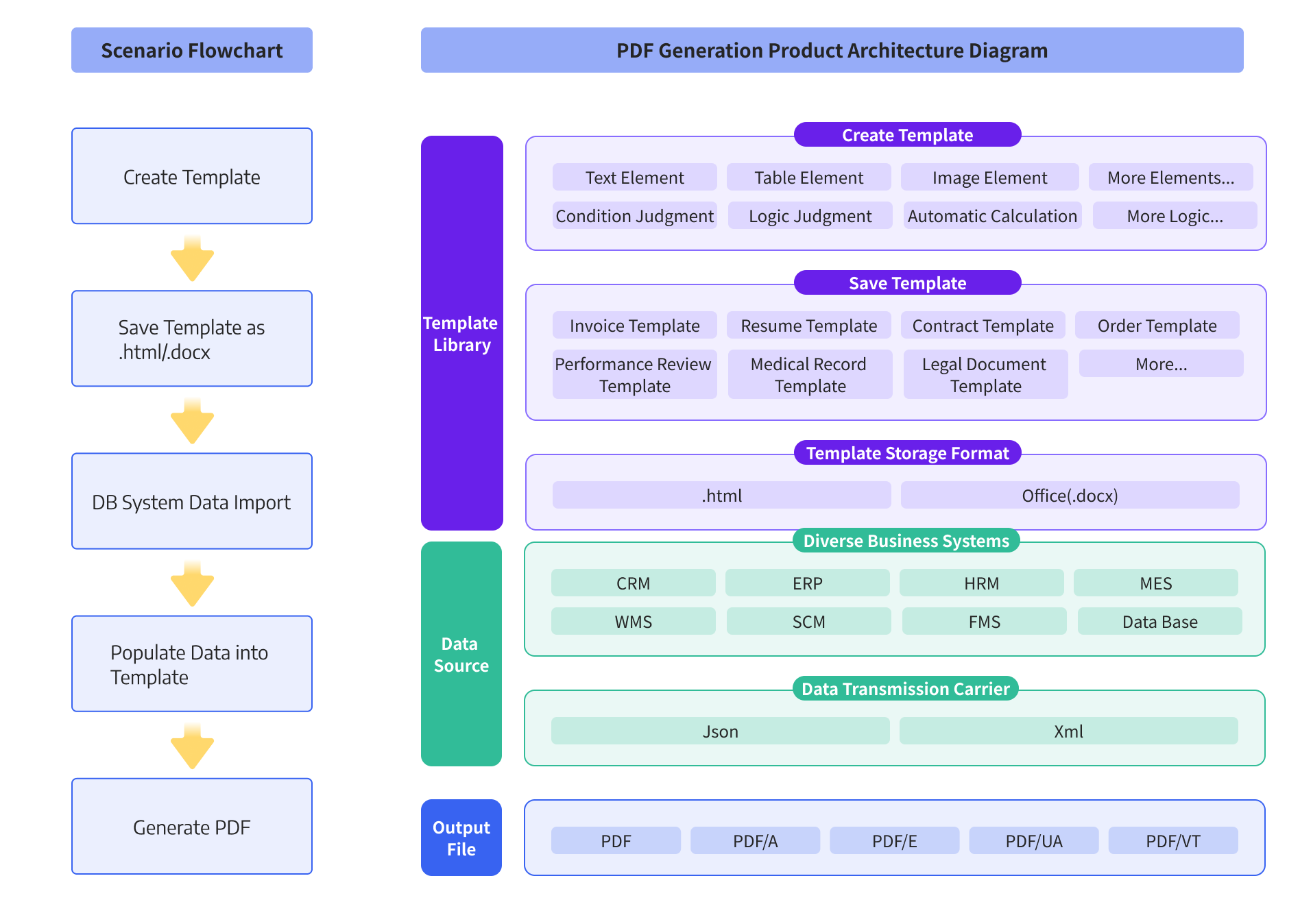
Document generation is a data-driven process. Based on the structured input data, template tags in the document template are replaced and dynamic content of the final document is generated. Each set of input data may produce a different document from the document template.
- Input data: It always is structured data like JSON, database, and more.
- Templates: Commonly the HTML, Word, Excel, PPT files are used.
- Document generation SDKs: Provide the technologies to write the input data into templates as wished, and generate the result files.
What is pdfHTML of iText?
pdfHTML is an add-on module for the iText 7 platform that converts HTML code and its corresponding CSS into a PDF document. The pdfHTML plugin was specifically developed to work with the re-architected and rewritten iText 7 PDF platform, fully leveraging iText 7’s enhanced and new features.
Supported Programming Languages: C#, Java
What is the ComPDF Generation?
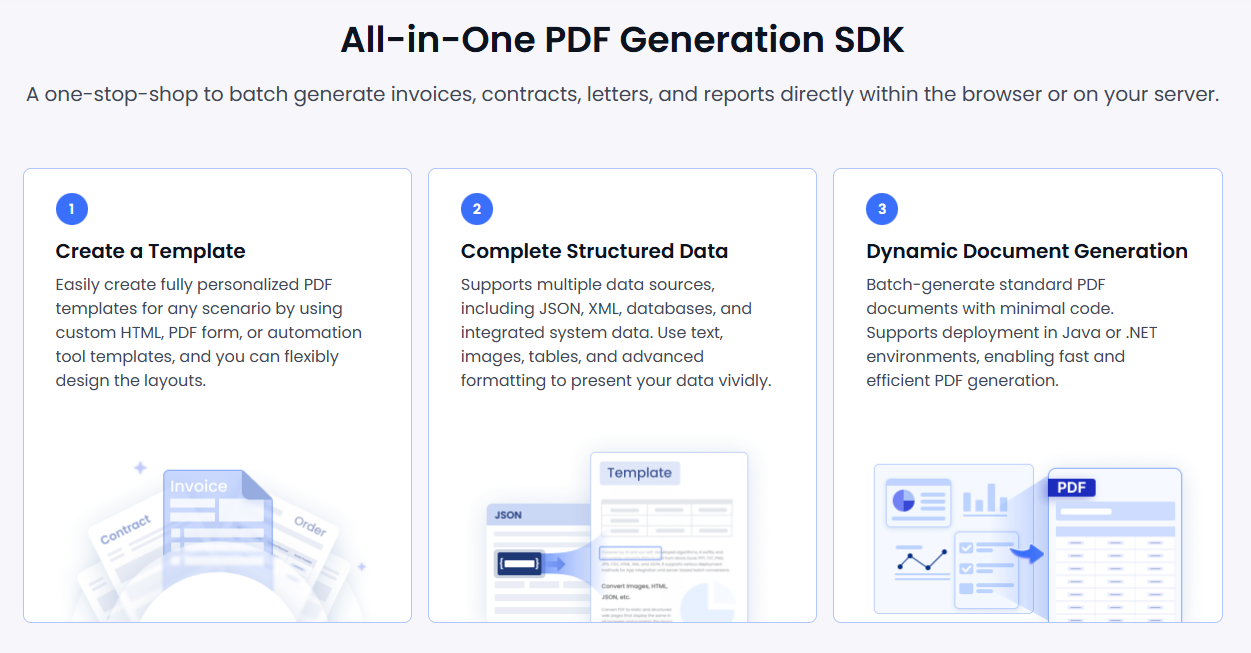
ComPDF Generation is a powerful server-side PDF generation solution that allows developers to automate the creation of structured and richly styled PDF documents.
It allows customers to customize templates for document generation or use existing ones, importing data as needed to meet specific business requirements. ComPDF Generation supports a wide range of content types during template design and data filling, including text, images, tables, headers and footers, barcodes, hyperlinks, dynamic data, and content displayed based on conditional logic.
In addition, customers can freely configure style properties according to their branding or formatting requirements — for example, text size, bold, and color; image dimensions, borders, and margins; as well as table borders, column widths, row heights, background colors, and more — to meet various layout needs.
Beyond template-based PDF generation, we also provide APIs that allows customers to generate PDF files directly through the API. This is especially suitable for automated, high-volume, or time-sensitive document generation scenarios, such as analytics platforms automatically producing periodic reports.
Supported Programming Languages: C#, Java, C++
Core Features and Technical Comparison
Both ComPDF and iText support the creation of rich HTML templates and dynamic data filling for automated or batch PDF file generation. ComPDF’s API for table generation provides a substantial technical advantage in terms of efficiency, speed, and complexity handling for high-demand business applications.
ComPDF enhances PDF table generation by providing a native API, ideal for high-volume generation, real-time reporting, and performance-critical scenarios. It excels in handling dynamic table structures, complex data sources, and secure data applications, while offering precise control over formatting. The API also reduces front-end rendering load in mobile or edge environments and supports headless, server-side generation where a browser is unavailable.
Performance, Rendering, and Stability
A comprehensive evaluation of multiple core functions including text, images, tables, and styles shows that ComPDF Generation significantly outperforms iText 9.4.0 in performance. Its overall processing speed is faster in single-threaded and multi-threaded (8-thread) environments. It performs particularly well in key scenarios such as CSS style rendering, complex table, and graphic processing.
ComPDF Generation is capable of providing faster, more stable, and more cost-effective solutions for high-load, large-volume enterprise-level document generation tasks, making it an ideal technical choice for building automated document generation workflows.
Test Environment:
Libraries:
ComPDF Java PDF Generation Library: V1.0.0
iText: V9.4.0
Detailed Test Results:
|
ComPDF Generation 1.0.0 |
iText 9.4.0 |
||
|
Overall Performance |
Single-threaded (ms) |
3883 ms |
Takes much longer |
|
Multi-threaded (8) (ms) |
1829 ms |
Takes much longer |
|
|
Complex Text Rendering Performance Test |
Single-threaded (ms) |
1136 ms |
Takes longer |
|
Multi-threaded (8) (ms) |
569 ms |
Takes less time |
|
|
High-Resolution Image Embedding Test |
Single-threaded (ms) |
741 ms |
Takes longer |
|
Multi-threaded (8) (ms) |
557 ms |
Takes longer |
|
|
Border CSS Style Rendering |
Single-threaded (ms) |
240 ms |
Takes much longer |
|
Multi-threaded (8) (ms) |
61 ms |
Takes much longer |
|
|
Complex Table Structure and Style Rendering |
Single-threaded (ms) |
419 ms |
Takes much longer |
|
Multi-threaded (8) (ms) |
129 ms |
Takes much longer |
|
|
Nested Block-Level Elements |
Single-threaded (ms) |
303 ms |
Takes longer |
|
Multi-threaded (8) (ms) |
106 ms |
Takes longer |
|
|
SVG and Vector Path Rendering |
Single-threaded (ms) |
394 ms |
Takes similar time |
|
Multi-threaded (8) (ms) |
137 ms |
Takes longer |
|
|
Multi-level Lists and Custom Bullets |
Single-threaded (ms) |
423 ms |
Takes longer |
|
Multi-threaded (8) (ms) |
201 ms |
Takes longer |
|
|
Color and Blended Color CSS Rendering |
Single-threaded (ms) |
227 ms |
Takes much longer |
|
Multi-threaded (8) (ms) |
69 ms |
Takes much longer |
|
Service & Support
When choosing any SDK, in addition to technical capabilities, licensing and technical support are also key factors to consider.
Technical Support:
iText relies heavily on community resources due to limited official documentation, requiring more developer time for troubleshooting.
In contrast, ComPDF offers 24/5 one-on-one support, comprehensive documentation, regular updates, and end-to-end assistance, reducing implementation effort and accelerating deployment.
Licensing & Pricing:
iText’s pdfHTML uses dual licensing (AGPL and commercial), making it costly for closed-source or commercial applications.
ComPDF, however, provides a simplified, transparent, and competitive pricing model, offering a better price-to-performance ratio.
Which PDF Generation Library Is Right for You?
Both iText pdfHTML and ComPDF generation libraries are powerful, but they each have their own advantages.
iText is free for non-commercial projects, though commercial use requires a license, making it suitable for teams that value a mature, established SDK and can accommodate higher costs for specialized or deeply customized PDF rendering.
ComPDF is designed for enterprises seeking similar functionality with faster, multi-threaded PDF generation and low integration barriers. It also offers flexible pricing and reliable technical support, ensuring high stability and efficiency for high-volume document processing while making it cost-effective to control long-term operational costs.
Conclusion
ComPDF is the ideal choice for businesses handling dynamic data and prioritizing development efficiency and commercial value. Not only does ComPDF allow for highly customizable HTML template creation to automate PDF document generation, but it also provides a native API that allows for the direct creation of PDF tables, positioning it as an ideal solution for modern, high-performance enterprise applications.