
Model Context Protocol, or MCP, is becoming a core idea in the modern AI stack because it helps large language models work with live data, external tools, and real workflows instead of replying from training data alone. A useful way to understand MCP is to treat it as a universal interface for AI: rather than building a separate integration for every host application and every external system, teams can use MCP to standardize how AI clients discover capabilities, read context, and invoke actions.
This article explains what MCP is, how it works, why it matters, where it is used, and how to adopt it safely.
What Is MCP?
MCP is an open standard for connecting AI applications to external context and capabilities in a structured way. It gives an AI assistant a consistent method to discover available tools, read useful information from connected systems, and perform approved actions when needed. Think of it as a USB-C style interface for AI: a shared connector that makes many different clients and many different services easier to connect without custom wiring every time.
MCP Server vs MCP
MCP Server is an implementation of the MCP protocol specification. MCP itself is the protocol, while an MCP server exposes specific capabilities (e.g., GitHub access, DB queries) to AI clients. A host connects to multiple servers via its MCP client.
MCP vs APIs vs RAG
MCP works alongside APIs and RAG, not as a replacement. MCP doesn't replace APIs—it standardizes the AI integration layer above them. It also builds on function calling but adds portability and reusability. RAG retrieves information; MCP connects to external context/actions. Use both. One-off connectors work for small projects but don't scale. MCP offers long-term value for reusability and clean architecture at scale.
Why Was the Model Context Protocol Created?
The N × M Integration Problem
MCP was created to solve the scaling problem that appears when many AI clients need access to many tools. Without a standard, each host application requires a separate integration for each external system. As the number of clients and services grows, this creates an N × M explosion of duplicated work, inconsistent behavior, and rising maintenance costs. MCP turns that problem into an M + N challenge by introducing a shared interface layer that any compliant client or server can plug into.
The Limits of Standalone LLMs
Standalone large language models have a fundamental limitation: they do not automatically know what has changed in live systems and cannot reliably work with external tools on their own. Without current context, AI responses become generic or outdated. MCP addresses this by acting as a bridge between AI models and real-time information, making it possible for assistants to work with live business data, documents, and system state instead of relying solely on training data.
What Can MCP Be Used For?
Coding and DevOps Workflows
Developer tooling is one of the clearest use cases for MCP. A coding assistant becomes far more useful when it can inspect repositories, read local files, search commit history, check CI results, review issues, and interact with approved development tools using live engineering context instead of incomplete prompt context. MCP makes it straightforward to give a coding assistant access to exactly the right set of developer tools without building a custom integration for each one.
Enterprise Assistants and Internal Knowledge
MCP is a strong fit for enterprise assistants that need current business context. Finance assistants can query live dashboards. HR assistants can reference internal policy documents. Support assistants can retrieve ticket history or customer status from approved systems of record. In each case, MCP provides a standardized way for the assistant to access the right information without hard-coding system-specific connectors for every source.
Document and Workflow Automation
MCP is well suited to document-heavy workflows such as extracting fields from PDFs, classifying incoming documents, routing records for review, and combining information from multiple systems. ComPDF AI supports MCP for intelligent document extraction, so an AI client can extract text and structured data from PDF files or images as part of a broader workflow instead of treating extraction as a separate manual step. This approach connects document processing directly into the AI workflow rather than leaving it as an isolated pre-processing task.
Why Teams Adopt MCP?
Faster Integration and Reuse
For developers, one of MCP's biggest advantages is lower integration overhead. A standard interface makes it easier to connect multiple host applications to multiple services without redoing the same work for each combination. A server built once can be reused across different clients, which speeds up experimentation and improves reuse across projects and teams.
Better Grounding and More Useful Agents
For AI applications, the benefit is not just convenience but better performance in real tasks. Access to live context and structured tools helps reduce vague or outdated responses and makes it easier for assistants to complete multi-step workflows in a more reliable and verifiable way.
More Control for Enterprise Rollout
For enterprises, MCP creates a cleaner model for governance. Instead of relying on scattered private integrations, teams can think in terms of approved servers, scoped permissions, monitoring, and repeatable access patterns as AI moves from pilots into production. This makes it easier to audit what the AI did, restrict what it can access, and scale responsibly.
How Does MCP Work?
At a high level, MCP follows a simple interaction flow: a user makes a request, the model recognizes that it needs outside context or an external action, the MCP client discovers the relevant capabilities from connected servers, the request is executed on the appropriate server, and the result returns to the model so it can produce the final answer.
Inside MCP: Host, Client, Server, and Transport
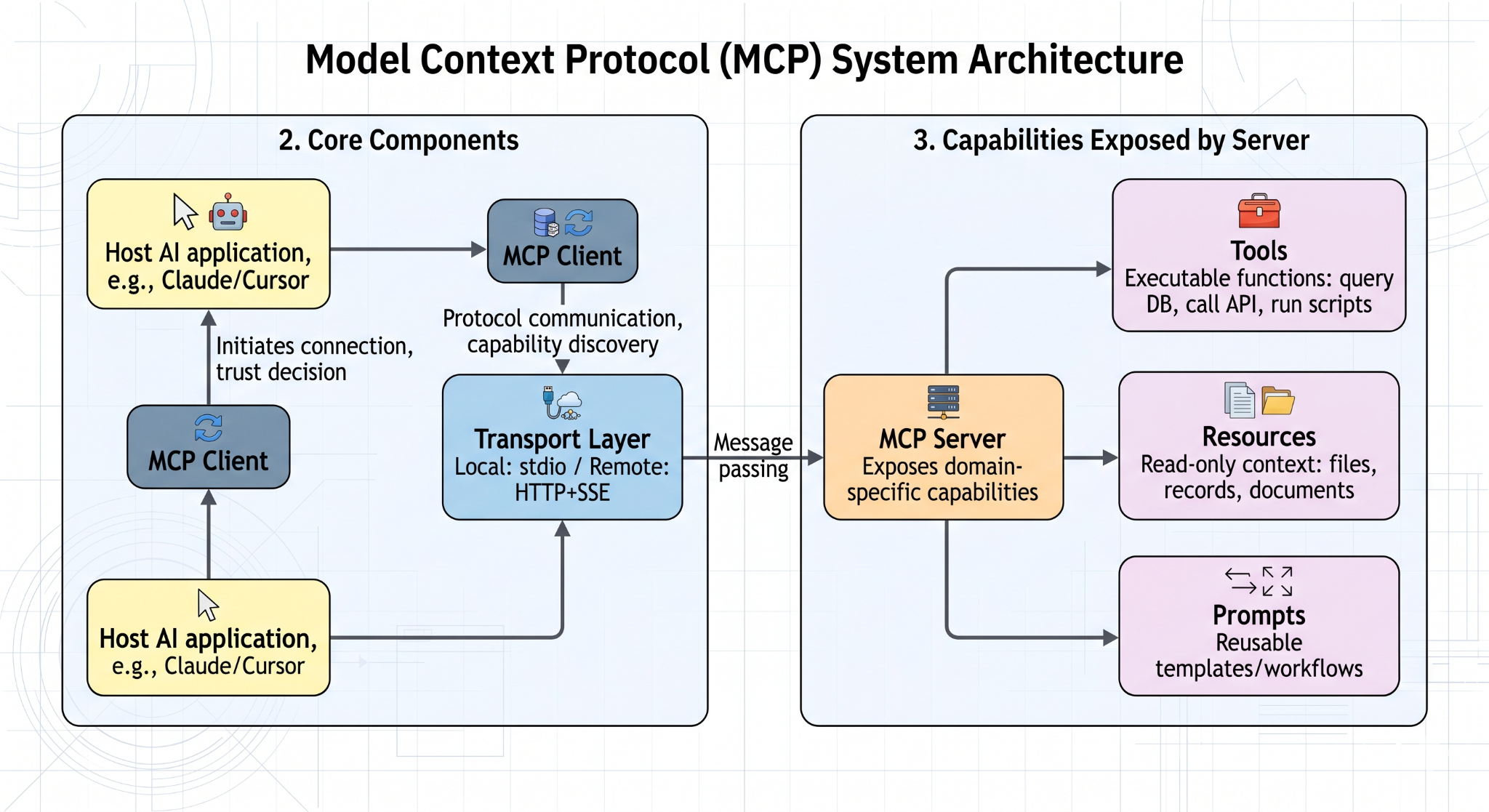
MCP has four core components:
- Host: The AI application the user interacts with, such as Claude, Cursor, or a custom enterprise assistant. The host initiates MCP connections and decides which servers to trust.
- MCP Client: The component inside the host application that handles protocol communication, capability discovery, and message exchange with servers.
- MCP Server: A program that exposes capabilities from a specific domain — such as file access, database queries, or document extraction — to any compatible MCP client.
- Transport Layer: The mechanism that carries structured messages between client and server. MCP supports both local connections (standard I/O for same-machine servers) and remote connections (HTTP with Server-Sent Events for network-accessible servers).
Tools, Resources, and Prompts
MCP servers can expose three types of capabilities:
- Tools: Functions the model can invoke to take action, such as querying a database, calling an API, or running a script. Tools are the action layer of MCP.
- Resources: Read-only data the model can access as context, such as files, records, or documents. Resources support structured grounding without giving the model write access.
- Prompts: Reusable prompt templates or workflow definitions that package common AI tasks for consistent reuse across clients.
Together, these three building blocks make MCP broader than simple function calling because it supports both structured action and structured context in a single standard interface.
A Typical Request Flow
A complete MCP request flows through the following steps:
1. The user submits a request to the host application.
2. The model determines it needs external context or needs to perform an action.
3. The MCP client queries connected servers to discover available capabilities.
4. The model selects the appropriate tool or resource and the client sends the request to the relevant server.
5. The server executes the request and returns a structured result.
6. The model incorporates the result into its response.
7. The final answer is returned to the user.
Approvals, permissions, and logging can wrap around the entire flow so the assistant stays useful without losing user control over what actions are actually taken.
How to Get Started with MCP?
The recommended way to learn MCP is to start with a prebuilt server and a compatible client. Choose a simple, well-scoped use case, connect the server, inspect the capabilities it exposes, and test a few requests end to end. Starting narrow gives you a clear view of the MCP interaction model before you expand to more complex workflows.
Click to get the official MCP documentation and get started. SDKs are available for Python, TypeScript, Java, Kotlin, and C#. A growing library of prebuilt servers covers common integrations including GitHub, PostgreSQL, Slack, Google Drive, and file systems.
Security and Deployment Considerations
Main Risks to Watch
MCP should be treated as infrastructure rather than a casual plugin layer. Key risks include:
- Excessive permissions — servers granted more access than they actually need
- Weak authentication — clients that do not verify server identity
- Untrusted servers — connecting to servers from unverified sources
- Prompt injection — malicious content in server responses that tries to hijack model behavior
- Accidental secret exposure — credentials or sensitive data leaking through tool outputs
- Poor observability — no clear record of what actions were taken or what data was accessed
Local vs Remote and Safe Rollout
Local MCP servers are easier to test and reason about for personal workflows and local development tools. Remote servers are better suited for centralized services and shared team access. For a safe rollout, the recommended approach is to:
- Start with read-only capabilities before enabling write or action tools
- Apply least-privilege credentials for every server connection
- Require explicit user approval for any write or destructive actions
- Maintain allowlists of approved servers rather than open-ended discovery
- Enable logging for all tool calls and resource accesses
FAQs
What does MCP stand for?
MCP stands for Model Context Protocol. It is an open standard for connecting AI applications to external context, tools, and workflows in a reusable way.
What is an MCP server?
An MCP server is a program that exposes tools, resources, or prompts from an external system to an AI client through the MCP standard. It can run locally or remotely depending on the use case.
Who created MCP?
Anthropic introduced an open-sourced MCP in November 2024. Support has since expanded across a broader ecosystem of AI tools, developer products, and infrastructure vendors.
Does MCP replace APIs or RAG?
No. MCP does not replace APIs, and it does not replace RAG. APIs still provide the underlying system access, while RAG remains valuable for retrieval-based grounding. MCP standardizes how AI applications connect to tools, context, and actions around those systems.