
PDF Generation Template Editor
Open-source visual PDF generation engine with customizable templates and developer-friendly APIs.
The Generation from HTML feature requires an HTML template and structured data for filling the template, which is JSON data, to generate a standard HTML. Then, by using the corresponding interface of Generation from HTML, you can convert the standard HTML into a PDF document.
The template is an HTML file, and a matching JSON data file is also required. The JSON data is a standard JSON file. The HTML template file needs to be combined with the JSON data to generate a standard HTML. The process of generating HTML by combining JSON data and the HTML template supports variables, if statements, for loops, arithmetic operations, and common functions.
HTML template example:
<!doctype html>
<html>
<body style="margin: 0; padding: 0;">
<table cellpadding="0" cellspacing="0" width="100%" style="border-collapse: collapse; margin: 0 auto">
  <tr>
    <td style="padding-top: 40px;">
      <img
          src="{% if compdfkit %}images/logo.png{% else if compdfkit2 %}images/logo2.png{% else %}images/logo3.png{% endif %}"
          alt="PDF Technologies"
          width="203"
          height="50">
    </td>
    <td style="padding-top: 40px; text-align: right;">
      <img src="images/invoice.png" alt="invoice" width="132">
      <td style="border: 1px solid #8A8EA8; padding: 2px 10px;">{{billNo}}</td>
    </td>
  </tr>
</table>
<table cellpadding="0" cellspacing="0" width="100%" style="border-collapse: collapse;">
  <!-- {% set totalprice = 0 %} -->
  <!-- {% for item in items %} -->
  <tr style="height:64px;color:#333;">
    <td style="width:70px;height:70px;border-bottom: 2px solid #F3F3F3; padding-left: 10px; text-align: left;">
      {{ item.index }}
    </td>
    <td style="width: 160px;border-bottom: 2px solid #F3F3F3; font-size: 13px; line-height: 15px; color: #121E3F;text-align:left;">
      <div>
        <p style="font-size: 13px; line-height: 15px; font-weight: bold; color: #121E3F; margin: 0;">
          {{ item.product }}
        </p>
        <p style="font-size: 11px; line-height: 12px; padding-top: 4px; color: #5F6881; margin: 0;">
          {{ item.startDateAndEndDate }}
        </p>
      </div>
    </td>
    <td style="width: 130px;border-bottom: 2px solid #F3F3F3; font-size: 13px; line-height: 15px; color: #121E3F;text-align:left;">
      {{ item.paymentCycle }}
    </td>
    <td style="width: 100px;border-bottom: 2px solid #F3F3F3; font-size: 13px; line-height: 15px; color: #121E3F;text-align:left;">
      {{ item.gearLevel }}
    </td>
    <td style="width: 100px;text-align:left;border-bottom: 2px solid #F3F3F3; font-size: 13px; line-height: 15px; color: #121E3F;">
      $ {{ item.price }}
    </td>
  </tr>
  <!-- {% set totalprice = totalprice + item.price %} -->
  <!-- {% endfor %} -->
  <tr>
    <td style="width:70px;"></td>
    <td style="width:160px;"></td>
    <td colspan="2" style="width: 100px; text-align:right; font-weight: bold; font-size: 16px; line-height: 18px; color: #121E3F; padding-right: 72px;">Total:</td>
    <td style="width: 100px; text-align:left; font-weight: bold; font-size: 16px; line-height: 18px; color: #121E3F;">$ {{round(totalprice * (1 + tax * 0.01), 2)}}</td>
  </tr>
</table>
</body>
</html>As shown in the example above, the HTML template contains some non-HTML standard content, such as {% if compdfkit %}, {{billNo}}, <!-- {% set totalprice = totalprice + item.price %} -->, and <!-- {% for item in items %} -->. This non-standard HTML content includes variables, if statements, for loops, arithmetic operations, and common functions, among these types.
Variables
<td style="border: 1px solid #8A8EA8; padding: 2px 10px;">{{billNo}}</td>The above {{billNo}} is a variable, which needs to be enclosed in {{ }} and corresponds to an entry named billNo in the JSON file.
If the corresponding name does not exist in the JSON file, it needs to be defined first. Below is an example of defining a variable.
<!-- {% set totalprice = 0 %} -->In the example template, the line of code above defines a variable named totalprice. Similar to the previous billNo variable, it is used as follows after being enclosed in {{ }}: {{totalprice}}.
Arithmetic Operations
<!-- {% set totalprice = totalprice + item.price %} -->The line of code above performs calculations on totalprice, supporting addition, subtraction, multiplication, and division.
If Statements
<img
     src="{% if compdfkit %}images/logo.png{% else if compdfkit2 %}images/logo2.png{% else %}images/logo3.png{% endif %}"
     alt="PDF Technologies"
     width="203"
height="50">The {% if compdfkit %} … {% else if compdfkit2 %}...{% else %}...{% endif %} is a complete if statement structure, where else if and else are optional. The variables compdfkit and compdfkit2 correspond to entries with the same names in the JSON file.
For Loops
<!-- {% set totalprice = 0 %} -->
<!-- {% for item in items %} -->
               ……….
      <!-- {% set totalprice = totalprice + item.price %} -->
<!-- {% endfor %} -->{% for item in items %}...{% endfor %} is a structure for a for loop. Here, items is an array type of data in the JSON file.
Common Functions
<td style="width: 100px; text-align:left; font-weight: bold; font-size: 16px; line-height: 18px; color: #121E3F;">$ {{round(totalprice * (1 + tax * 0.01), 2)}}</td>In the code, round is a function that can take variables as parameters. totalprice and tax are variables. The entire function is enclosed in {{ }}.
Prepare JSON data in standard format to combine with the HTML template and fill the data into the template to generate standard HTML. Example of JSON data:
{
    "address": "456 Oak Avenue",
    "billNo": "2345678901",
    "company": "TechCorp Ltd.",
    "country": "Canada",
    "email": "[email protected]",
    "firstName": "Alice",
    "gearLevel": "Pro",
    "compdfkit": false,
    "compdfkit2": true,
    "invoiceDate": "2025-01-15",
    "lastName": "Smith",
    "paymentCycle": "Yearly",
    "price": "1200",
    "province": "Ontario",
    "startDateAndEndDate": "2025-01-15 to 2025-02-15",
    "tax": 8,
    "zip": "K1A 0A6",
    "items": [
        {
            "index": 1,
            "product": "ComPDFKit Pro",
            "startDateAndEndDate": "2025-01-15 to 2025-02-15",
            "paymentCycle": "Yearly",
            "gearLevel": "Pro",
            "price": 800
        },
        {
            "index": 2,
            "product": "ComPDFKit API",
            "startDateAndEndDate": "2025-01-15 to 2025-02-15",
            "paymentCycle": "Monthly",
            "gearLevel": "Basic",
            "price": 400
        }
    ]
}Convert JSON file combined with HTML template to PDF:
//HTML template file path
String templatePath = "/template_1.html";
//json file path
String jsonPath = "/data1.json";
//Output HTML path
String outHtmlPath = "/outHtml.html";
//Output PDF path
String outPdfPath = "/outPdf.pdf";

//Combine the JSON file with the HTML template to generate HTML content
CHtmlConverter.CErrorCode id = CHtmlConverter.HtmlRenderTemplate(templatePath, jsonPath, outHtmlPath);
//Convert HTML to PDF
id = CHtmlConverter.ConvertToPdf(outHtmlPath, outPdfPath);In the example,HtmlRenderTemplate and ConvertToPdf these two steps can be replaced by the interfaceRenderAndConvertToPdf.
//HTML template file path
String templatePath = "/template_1.html";
//json file path
String jsonPath = "/data1.json";
//Output PDF path
String outPdfPath = "/outPdf.pdf";
CHtmlConverter.CErrorCode id = CHtmlConverter.RenderAndConvertToPdf(templatePath, jsonPath, outPdfPath);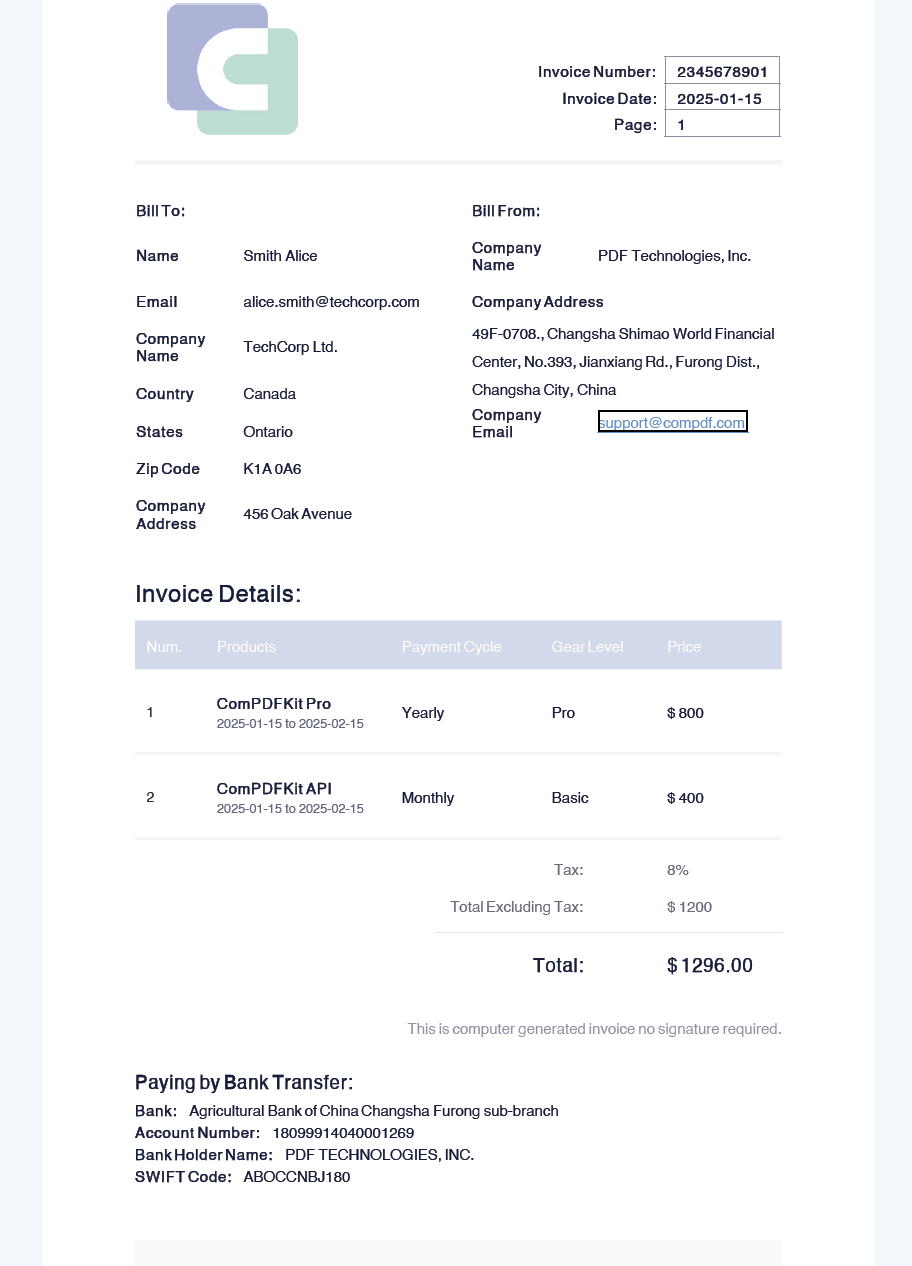
Configuration Properties
When converting HTML to PDF, you can configure certain properties such as base URI, page size, and fonts.
//HTML template file path
String templatePath = "/test/template_1.html";
//json file path
String jsonPath = "/test/data1.json";
//Output HTML path
String outHtmlPath = "/test/outHtml.html";
//Output PDF path
String outPdfPath = "/test/outPdf.pdf";

//Combine the JSON file with the HTML template to generate HTML content
CHtmlConverter.CErrorCode id = CHtmlConverter.HtmlRenderTemplate(templatePath, jsonPath, outHtmlPath);

//Use properties when conventing
CConverterProperties properties = new CConverterProperties();
//Set page size
CSize size = new CSize(400, 600);
properties.setPageSize(size);
//Set font directory
CFontProvider fontProvider = new CFontProvider();
fontProvider.addDirectory("/test/fontDir/");
properties.setFontProvider(fontProvider);

//Convert HTML to PDF with Properties
id = CHtmlConverter.ConvertToPdf(outHtmlPath, outPdfPath, properties);The example uses fontProvider.addDirectory("/test/fontDir/"). You should provide some font files in the /fontDir/ directory, and the text in the HTML file can use these provided fonts. Below is part of the HTML example code, where the text inside the span uses the Sarabun font. Sarabun is a provided font, and the corresponding font files should be placed in the appropriate directory.
<style data-dito-stylesheet-name="setFonts">@font-face {
    font-family: "Sarabun";
}
@font-face {
    font-family: "Sarabun";
    font-style: italic;
}
@font-face {
    font-family: "SarabunThin";
}
@font-face {
    font-family: "SarabunsemiBold";
}</style>

<div style="margin-left:0in;margin-top:0pt;margin-bottom:0pt">
  <span style="font-family:Sarabun">
    <span style="color:black">
      <span style="font-size:26px">(PEA GECC Internal Audit)</span>
    </span>
  </span>
</div>During the conversion, the HTML template and JSON can be a content String, InputStream, File object, or file path. The generated PDF can be an OutputStream, File object, or file path. The previous example used file paths, while the following are examples using other types.
Use InputStream and OutputStream:
String templatePath = "/test/template_1.html";
String jsonPath = "/test/data1.json";
String outPdfPath = "/test/outPdf.pdf";
try {
    InputStream htmlIn = new FileInputStream(templatePath);
    InputStream jsonIn = new FileInputStream(jsonPath);
    OutputStream pdfOut = new FileOutputStream(outPdfPath);
    CHtmlConverter.CErrorCode error = CHtmlConverter.RenderAndConvertToPdf(htmlIn, jsonIn, pdfOut);
} catch (Exception e) {

}Use content String:
String getFileContent(String path) {
        StringBuilder content = new StringBuilder();
        try (BufferedReader br = new BufferedReader(new InputStreamReader(new FileInputStream(path)))) {
            String line;
            while ((line = br.readLine()) != null) {
                content.append(line).append(System.lineSeparator());
            }
            return content.toString();
        } catch (IOException e) {
            return "";
        }
    }

String templatePath = "/test/template_1.html";
String jsonPath = "/test/data1.json";
String outPdfPath = "/test/outPdf.pdf";
try {
    String templateStr = getFileContent(templatePath);
    String jsonStr = getFileContent(jsonPath);
    OutputStream pdfOut = new FileOutputStream(outPdfPath);
    CHtmlConverter.CErrorCode error = CHtmlConverter.RenderAndConvertToPdf(templateStr, jsonStr, pdfOut);
} catch (Exception e) {

}Use File:
String templatePath = "/test/template_1.html";
String jsonPath = "/test/data1.json";
String outPdfPath = "/test/outPdf.pdf";
try {
    File templateFile = new File(templatePath);
    File jsonFile = new File(jsonPath);
    File pdfFile = new File(outPdfPath);
    CHtmlConverter.CErrorCode error = CHtmlConverter.RenderAndConvertToPdf(templateFile, jsonFile, pdfFile);
} catch (Exception e) {

}