
PDF Generation Template Editor
Open-source visual PDF generation engine with customizable templates and developer-friendly APIs.
In Android SDK 3.2.1, you can draw badges, status hints, or signature placeholders over annotations and form fields. Overlays are visible only in the reader. They are not saved to the PDF or included in printing, thumbnails, or flattened output. To change the appearance stored in the PDF, see Update Annotation Appearances.
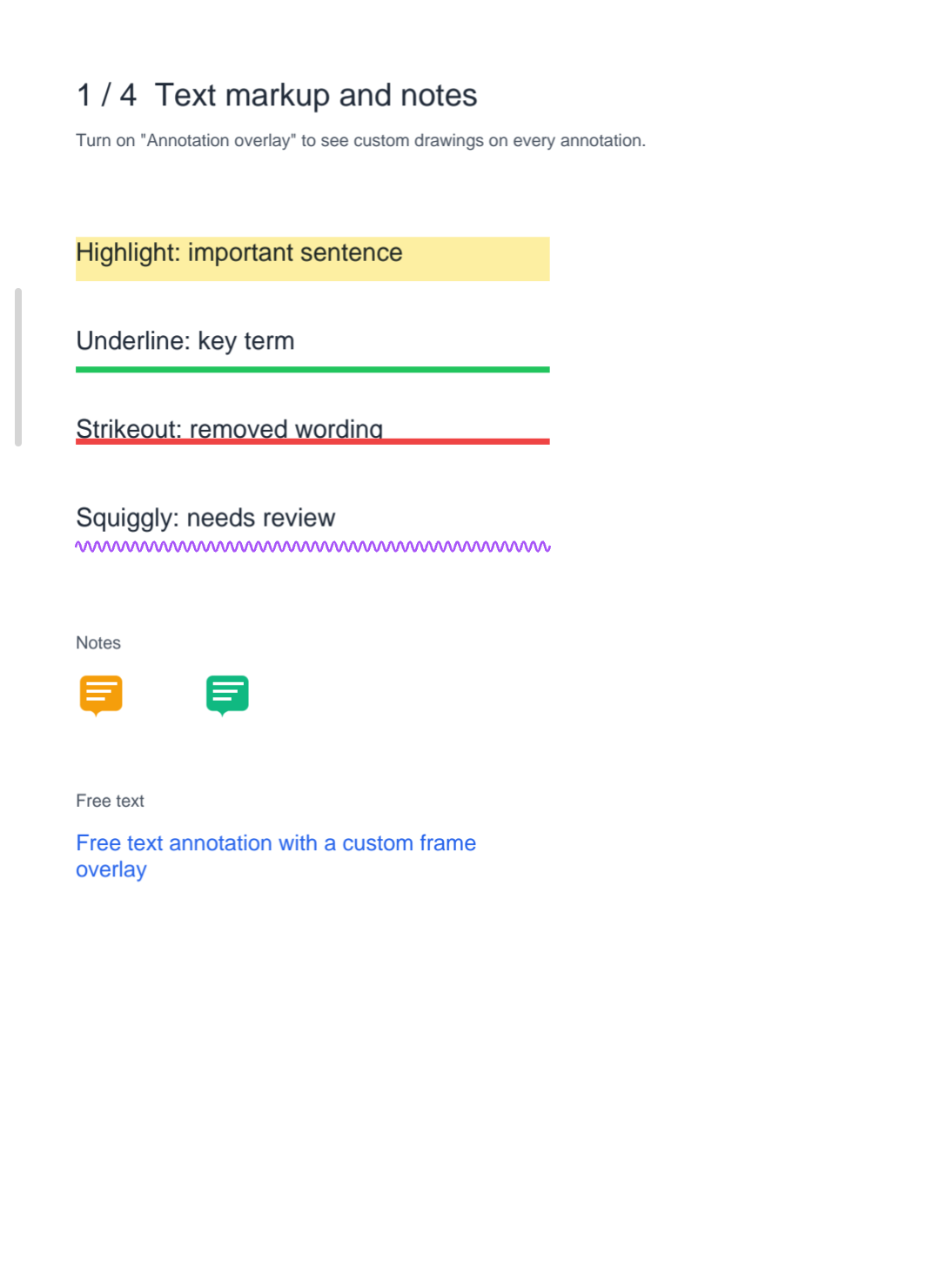
The same page is shown with overlays off and on. The overlays add an HL badge to the highlight and counters to the notes without changing the PDF.
| Overlays Off | Overlays On |
|---|---|
 | 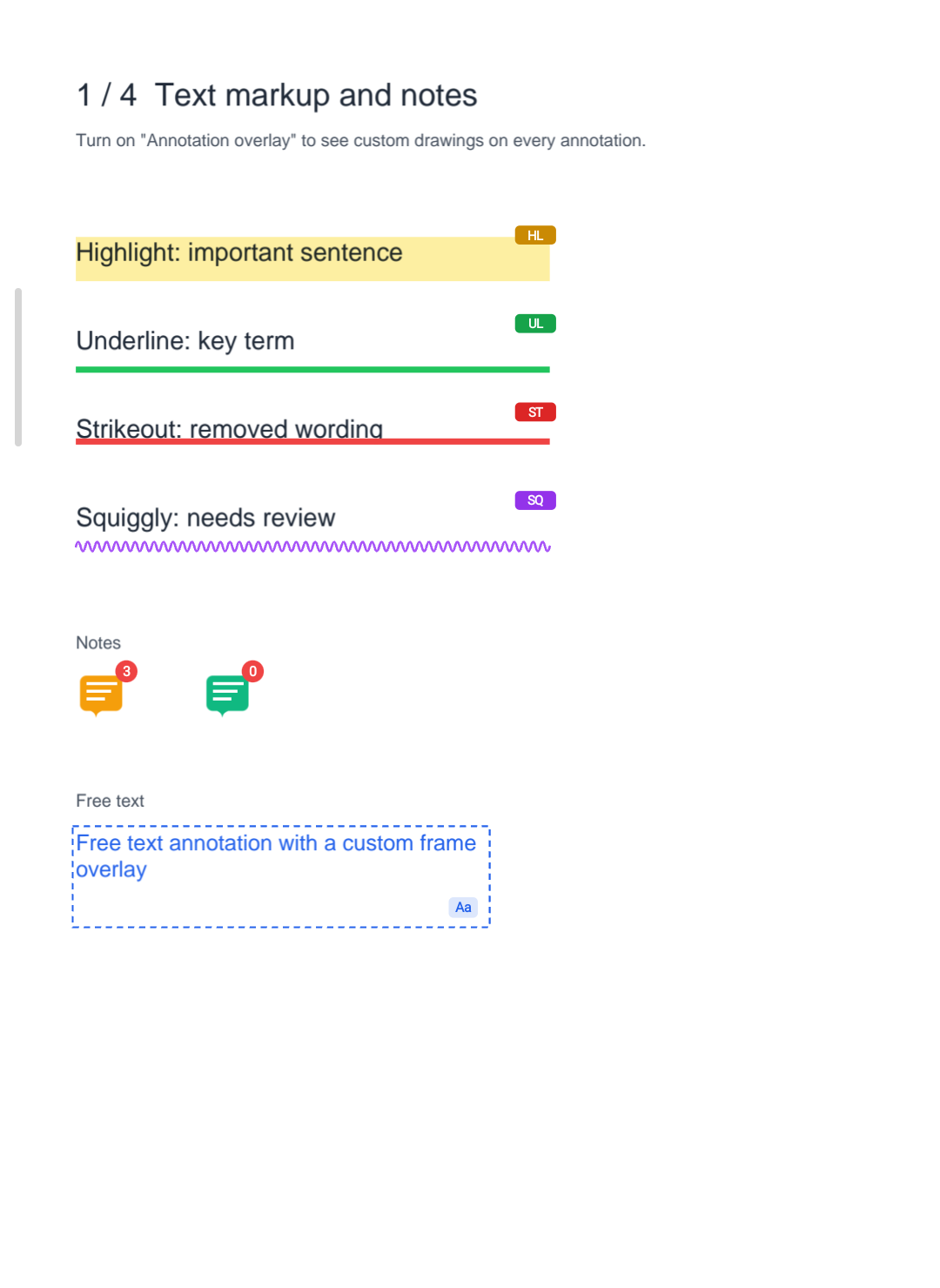 |
This example draws the HL badge shown above. Keep a single renderer instance in the activity or fragment that hosts the reader. For reader setup, see Using CPDFReaderView.
import android.graphics.Canvas;
import android.graphics.Color;
import android.graphics.Paint;
import com.compdfkit.core.annotation.CPDFAnnotation;
import com.compdfkit.ui.proxy.CPDFAnnotationOverlayContext;
import com.compdfkit.ui.proxy.CPDFAnnotationOverlayRenderer;

final class HighlightBadgeRenderer implements CPDFAnnotationOverlayRenderer {
    private final Paint background = new Paint(Paint.ANTI_ALIAS_FLAG);
    private final Paint label = new Paint(Paint.ANTI_ALIAS_FLAG);

    HighlightBadgeRenderer() {
        background.setColor(0xFFBF8200);
        label.setColor(Color.WHITE);
        label.setTextAlign(Paint.Align.CENTER);
    }

    @Override
    public boolean accepts(CPDFAnnotation annotation) {
        return annotation.getType() == CPDFAnnotation.Type.HIGHLIGHT;
    }

    @Override
    public void onDraw(Canvas canvas, CPDFAnnotationOverlayContext context) {
        float scale = context.getScale();
        float width = Math.min(24f * scale, context.getWidth());
        float height = Math.min(12f * scale, context.getHeight());
        float left = context.getWidth() - width;
        canvas.drawRoundRect(left, 0f, context.getWidth(), height,
                3f * scale, 3f * scale, background);
        label.setTextSize(height * 0.72f);
        float baseline = (height - label.ascent() - label.descent()) / 2f;
        canvas.drawText("HL", left + width / 2f, baseline, label);
    }
}The canvas origin is the top-left corner of the annotation's bounding rectangle. Width and height are in pixels; use getScale() to convert PDF points to pixels. To draw outside the annotation bounds, set the outset with getOverlayOutset(). If the overlay depends on custom annotation data, call invalidateAnnotationOverlay(annotation) after that data changes.
To draw a badge without changing tap behavior, register only the renderer. To show your own message when the user taps a highlight in annotation mode, also intercept its SELECT action.
import android.content.Context;
import android.widget.Toast;
import com.compdfkit.core.annotation.CPDFAnnotation;
import com.compdfkit.ui.proxy.CPDFAnnotationActionEvent;
import com.compdfkit.ui.proxy.CPDFAnnotationActionInterceptor;
import com.compdfkit.ui.reader.CPDFReaderView;

final class HighlightBadgeBinding {
    private final HighlightBadgeRenderer renderer = new HighlightBadgeRenderer();
    private final CPDFAnnotationActionInterceptor interceptor;

    HighlightBadgeBinding(Context context) {
        interceptor = event -> {
            if (event.getActionType() != CPDFAnnotationActionEvent.ActionType.SELECT
                    || event.getAnnotation().getType() != CPDFAnnotation.Type.HIGHLIGHT) {
                return false;
            }
            Toast.makeText(context, "Highlighted text", Toast.LENGTH_SHORT).show();
            return true;
        };
    }

    void attach(CPDFReaderView readerView) {
        readerView.addAnnotationOverlayRenderer(renderer);
        readerView.addAnnotationActionInterceptor(interceptor);
    }

    void detach(CPDFReaderView readerView) {
        readerView.removeAnnotationActionInterceptor(interceptor);
        readerView.removeAnnotationOverlayRenderer(renderer);
        readerView.invalidateAnnotationOverlays();
    }
}On the main thread, create HighlightBadgeBinding with the activity context and call attach(readerView). Call detach(readerView) on the same instance from the activity's onDestroy() or fragment's onDestroyView().
Interceptors run in registration order. Return true to suppress default selection for this tap, or false to pass the action to the next interceptor or default handler. This does not intercept long presses, drags, or selection immediately after creation. To handle taps on the overlay itself, have the renderer's isTouchable() return true and handle OVERLAY_TAP.
For Tools integration, see Custom Overlays and Programmatic Interception.