
PDF Generation Template Editor
Open-source visual PDF generation engine with customizable templates and developer-friendly APIs.
You can integrate the SDK in two ways:
Through ComPDF GitHub repo:
In MyApp folder, install @compdfkit_pdf_sdk/react_native by calling:
yarn add github:ComPDFKit/compdfkit-pdf-sdk-react-nativeThrough ComPDF npm package:
In MyApp folder, install run the following commands:
yarn add @compdfkit_pdf_sdk/react_nativeandroid/app/src/main/AndroidManifest.xml , add Internet Permission and Storage Permission:<manifest xmlns:android="http://schemas.android.com/apk/res/android"
package="com.compdfkit.flutter.example">
+ <uses-permission android:name="android.permission.INTERNET"/>
<!-- Required to read and write documents from device storage -->
+ <uses-permission android:name="android.permission.READ_EXTERNAL_STORAGE"/>
+ <uses-permission android:name="android.permission.WRITE_EXTERNAL_STORAGE"/>
<!-- Optional settings -->
+ <uses-permission android:name="android.permission.MANAGE_EXTERNAL_STORAGE" />
<application
+ android:requestLegacyExternalStorage="true"
...>
...
</application>
</manifest>assets directory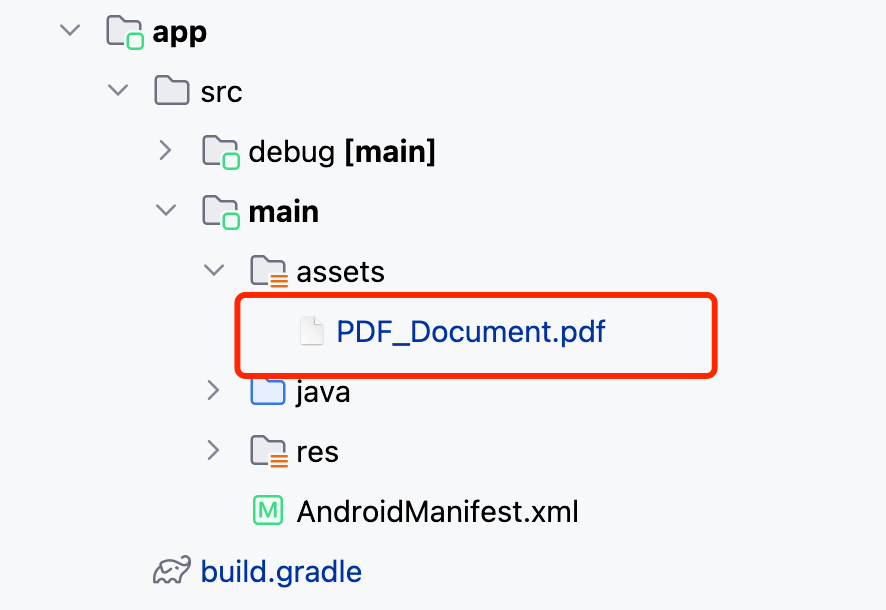
Replace App.js (or App.tsx) with what is shown for Usage Example
Finally in the root project directory, run react-native run-android.
open ios/Podfiletarget 'MyApp' do ... end block:target 'MyApp' do
# ...
+ pod "ComPDFKit", podspec:'https://file.compdf.com/cocoapods/ios/compdfkit_pdf_sdk/3.0.1/ComPDFKit.podspec'
+ pod "ComPDFKit_Tools", podspec:'https://file.compdf.com/cocoapods/ios/compdfkit_pdf_sdk/3.0.1/ComPDFKit_Tools.podspec'
# ...
endNote: If SSL network requests fail to download the ComPDF library when you run pod install, you can use the following method instead.
target 'MyApp' do
    # ...
+  pod 'ComPDFKit', :git => 'https://github.com/ComPDFKit/compdfkit-pdf-sdk-ios-swift.git', :tag => '3.0.1'
+  pod 'ComPDFKit_Tools', :git => 'https://github.com/ComPDFKit/compdfkit-pdf-sdk-ios-swift.git', :tag => '3.0.1'
    # ...
endIn the ios folder, run pod install.
Open your project’s Workspace in Xcode:
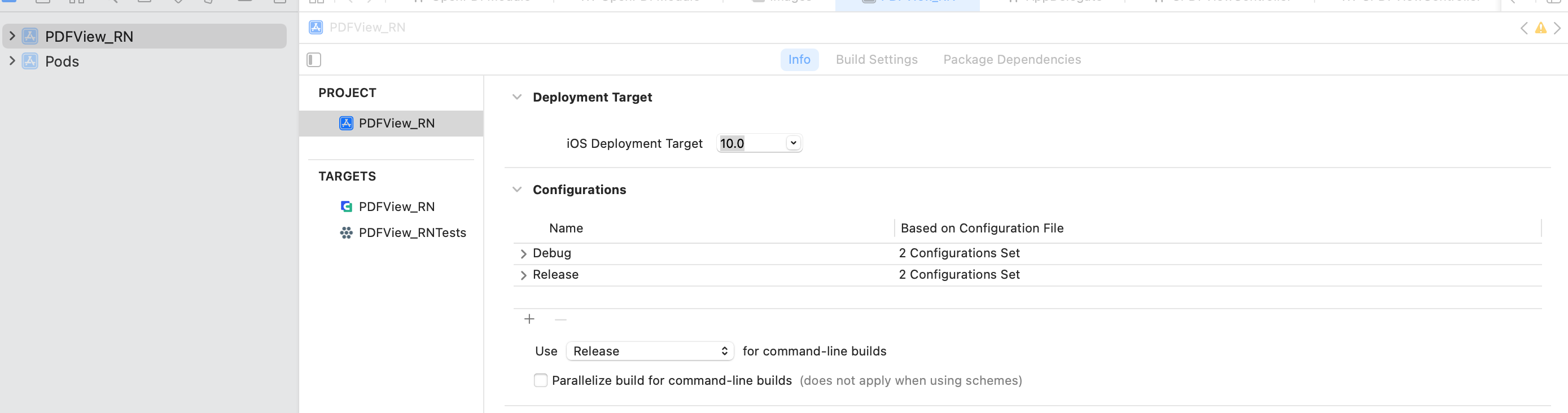
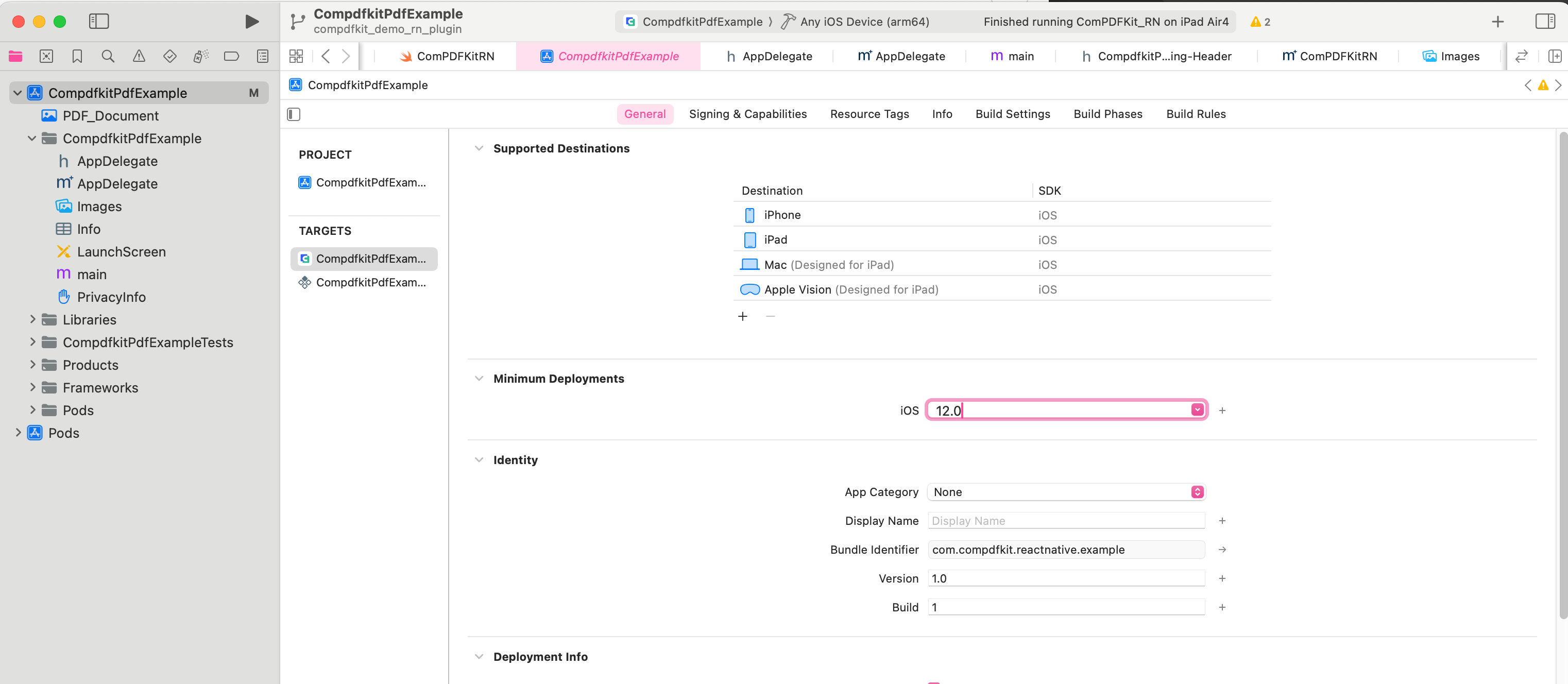
open ios/MyApp.xcworkspaceMake sure the deployment target is set to 13.0 or higher:
<key>NSCameraUsageDescription</key>
<string>Your consent is required before you could access the function.</string>

<key>NSMicrophoneUsageDescription</key>
<string>Your consent is required before you could access the function.</string>

<key>NSPhotoLibraryAddUsageDescription</key>
<string>Your consent is required before you could access the function.</string>

<key>NSPhotoLibraryUsageDescription</key>
<string>Your consent is required before you could access the function.</string>

<key>NSAppTransportSecurity</key>
  <dict>
    <key>NSAllowsArbitraryLoads</key>
    <true/>
</dict>Replace App.js (or App.tsx) with what is shown for Usage Example
Finally in the root project directory, run react-native run-ios.